
PrintEasy
Download ApkPrintEasy Application Screenshots




PrintEasy AI Editor's Review
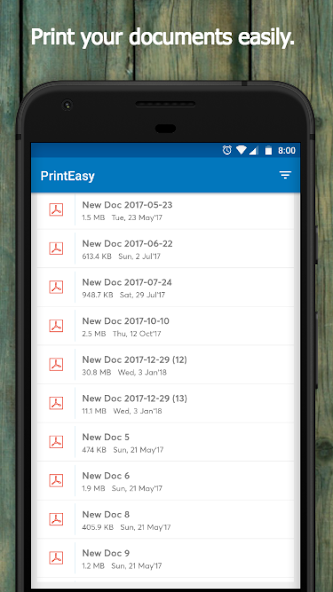
PrintEasy simplifies printing from your Android device. Print documents, photos, and web pages from anywhere. Enjoy seamless printing with various printer brands and models. A user-friendly solution for on-the-go printing needs.
Comprehensive Analysis
PrintEasy is a straightforward Android application designed to facilitate mobile printing. It allows users to print documents, photos, and web pages directly from their devices. The app boasts a simple interface, making it accessible to users of all technical skill levels. While it supports a wide array of printer brands, users may encounter compatibility issues requiring specific drivers. Overall, PrintEasy provides a convenient solution for basic printing needs, although it lacks advanced customization options.
Key Advantages
- Easy to use interface
- Supports a wide range of printers
- Convenient printing from anywhere
Areas for Improvement
- May require printer-specific drivers
- Limited advanced printing options
The Description of PrintEasy
Site Editorial Commentary:Print photos, PDFs, business cards and more on any WiFi printer with PrintEasy.
PrintEasy: Print Anything From Anywhere EasilyPrintEasy is your ultimate mobile printing solution, enabling you to effortlessly print documents, photos, and more from your Android device to virtually any printer, regardless of location. Say goodbye to tangled cables and complicated setups!
What can you print with PrintEasy?
- Photos: Capture and print your memories instantly.
- PDFs and Documents: Easily print bills, invoices, letters, and important messages.
- Web pages: Print articles, recipes, or any content directly from the web.
- Contacts: Keep a hard copy of your contacts for easy reference.
- Business cards, postcards & personal notes: Create and print personalized items with ease.
Whether your printer is in the same room or across the globe, PrintEasy provides a seamless and reliable mobile printing experience. It supports printing via WiFi, Bluetooth, and shared network printers, making it incredibly versatile.
Powerful Features:
- Intuitive and user-friendly interface: Simple and easy to navigate for a hassle-free printing experience.
- Print to WiFi, Bluetooth, and shared network printers: Connect to your printer using your preferred method.
- Customize your print jobs:
- Paper size, page range & orientation: Tailor your prints to your specific needs.
- Single or double-sided (duplex): Save paper with double-sided printing options.
- Color or B&W: Choose the color mode that suits your document.
- Copies, resolution, tray selection: Fine-tune your print settings for optimal results.
- Supports all major file formats (PDF, JPG, PNG, BMP, and more): Compatible with a wide range of documents and images.
- Unicode text printing – supports all languages: Print documents in any language without compatibility issues.
Design-Ready Templates:
Explore a variety of professionally designed templates for business cards, postcards, and more. Customize them to create unique and impactful materials.
Affordable or FREE! Unlock premium templates by watching reward videos and enjoy high-resolution printing for maximum impact.
Multilingual Support:
PrintEasy is available in:
German | French | Russian | Dutch | Portuguese | Hindi | Italian | Spanish
Permissions We Use – And Why:
- Contacts: To enable you to print your contact list (no data is stored or shared).
- Storage Access: To allow you to select images, PDFs, and documents for printing.
- Network Access: To discover WiFi-enabled printers in your vicinity.
Need help?
We're here to assist you. Contact us at [email protected].
Happy Printing!
What's New
Enjoy our latest update where we have fixed some bugs and improved our app to provide you a seamless printing experience along with payment for the business card using P coins.


