
Video FS caller Id
Download ApkVideo FS caller Id Application Screenshots
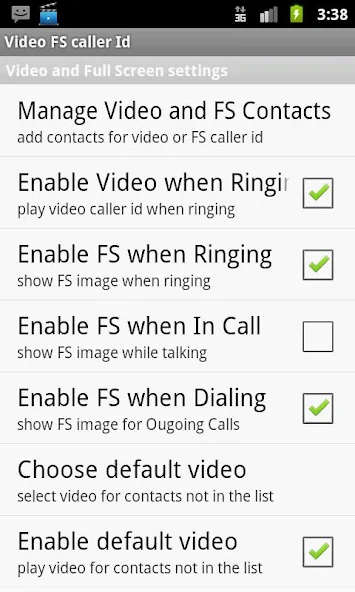


Video FS caller Id AI Editor's Review
Video FS Caller ID enhances incoming calls with full-screen video ringtones and caller ID. Customize your call screen with personalized videos, adding a visual flair to every call. Enjoy a more engaging and informative call experience.
Comprehensive Analysis
Video FS Caller ID transforms your call screen by displaying full-screen videos for incoming calls. This app allows users to set custom video ringtones, replacing the standard caller ID with personalized video clips. The full-screen display ensures clear visibility of the caller and video. While the app enhances the user experience, potential battery drain from continuous video playback and compatibility issues across different devices should be considered. Overall, it provides a unique way to identify callers and adds a fun, visual element to phone calls.
Key Advantages
- Personalized full-screen video caller ID
- Customizable video ringtones
- Enhanced visual call experience
Areas for Improvement
- Potential battery drain due to video playback
- Video compatibility issues on some devices
The Description of Video FS caller Id
Site Editorial Commentary:Video ringtone. Video caller id. Full screen caller id.
Enhance your Android experience with "Video FS Caller ID," a powerful app that transforms your calling experience. This app allows you to personalize your incoming calls with custom video ringtones and full-screen caller IDs.**Key Features:**
* **Video and Picture Caller ID:** Set a video clip or picture from your phone's gallery as your caller ID. Enjoy full-screen display for a visually engaging experience.
* **Custom Video Ringtones:** Use video clips as your default ringtone, adding a unique touch to your incoming calls.
* **Contact Customization:** Add video and picture contacts, tailoring the caller ID for each individual. Edit contacts to change display orientation.
* **Flexible Display Options:** Choose whether to display a caller's stock photo in a small frame over the video clip.
* **Video editing:** Set the start and end positions for video playback, ensuring the perfect clip plays every time.
* **Default Video Option:** Set a default video to play for contacts not in your list, and enable it via the "enable default video" option.
* **Volume Control:** Adjust the volume for video playback to your preference.
**Important notes:**
* If using a default video as a ringtone, consider adjusting your stock ringtone to avoid completely overriding the video clip's sound.
* The application will display portrait pictures as portrait, regardless of your selection.
* If your ringtone is set to silent, the video clip's volume will also be silenced.
* A full-screen picture will utilize your phone's full display if its resolution matches your phone's resolution and the display mode (portrait or landscape) matches the picture's capture mode.
**Free Trial:** Try out the app with a free trial version available for 2 days before making a purchase.


