
Pink 2 GO SMS PRO Theme
Download ApkPink 2 GO SMS PRO Theme Application Screenshots


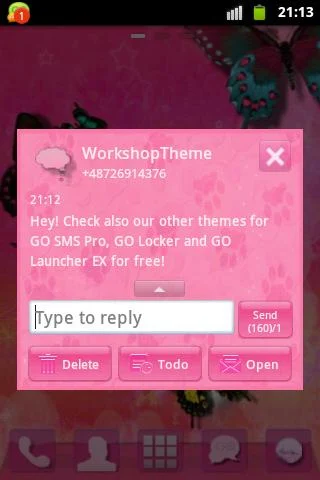

Pink 2 GO SMS PRO Theme AI Editor's Review
Pink 2 GO SMS Pro Theme: A visually appealing and feminine theme for GO SMS Pro. Personalize your messaging with a touch of pink, enhancing the user interface with a stylish and delightful design.
Comprehensive Analysis
Pink 2 GO SMS Pro Theme is a theme designed exclusively for the GO SMS Pro application. It offers a visually striking pink aesthetic to personalize your messaging experience. Installation is straightforward, integrating seamlessly within GO SMS Pro. The theme enhances the user interface with a feminine and stylish design. However, it's important to note that this theme necessitates the GO SMS Pro app and its pink-centric style might not suit everyone's preferences. It provides a simple way to change the look and feel of your SMS app.
Key Advantages
- Visually appealing pink design
- Easy to apply within GO SMS Pro
- Adds a feminine touch to messaging
Areas for Improvement
- Requires GO SMS Pro application
- May not appeal to all users due to its specific style
The Description of Pink 2 GO SMS PRO Theme
Site Editorial Commentary:Download cute, pink, light theme for free, to personalize GO SMS Pro!
Pink 2 GO SMS PRO Theme is designed to personalize your GO SMS Pro application with a touch of sweetness and style. Please note that this theme requires the GO SMS Pro application to be installed; you can download it for free from the Google Play Store.This theme offers a delightful way to customize your GOSMS Pro with an eye-catching aesthetic. The new Cute skin for GO SMS Pro features a sweet pink theme, specifically crafted for girls. The combination of pink, crimson, red, and sanguine colors, along with leopard and panther print accents, is sure to captivate.
Transform your Android device into a brighter, more brilliant, and compelling experience filled with love and happiness. Infuse your interactions with sweetness and romance.
This free theme includes a beautiful wallpaper, custom icons, and a meticulously designed layout, offering a visually pleasing experience.
To apply the Pink 2 GO SMS PRO Theme (also compatible with GO chat):
1. Download this theme for free from the Google Play Store.
2. Download GO SMS Pro for free from the Google Play Store.
3. Install and launch the GO SMS Pro app.
4. Tap the menu icon to reveal options, then select "Theme".
5. Navigate to the "Installed" tab.
6. Tap on the Pink 2 GO SMS PRO Theme to apply it.
This theme is suitable for anyone who appreciates a touch of pink and sweetness. Download it now to colorize your device with lovely pink hues.
To further customize the appearance settings:
1. Open the GO SMS Pro app.
2. Press Menu.
3. Press Advanced.
4. Press Appearance Settings.
From here, you can adjust various elements, including:
- The background of your messages.
- The displayed contact pictures.
- Or reset the settings to their default configuration.
Disclaimer: This application may display interstitial ads and banners to support its development.
Be sure to explore our other GOSMSPro Themes, GO Locker Themes, and GO Launcher EX themes, all available for free. We regularly publish new themes, so remember to check our developer account for updates.
This theme was created with passion by WorkshopTheme.
What's New
Fixed bugs


