
RocketRoute FlightPlan
Download ApkRocketRoute FlightPlan Application Screenshots


RocketRoute FlightPlan AI Editor's Review
RocketRoute FlightPlan offers comprehensive flight planning and in-flight support. It features worldwide coverage, intuitive interface, and real-time updates. Ideal for pilots seeking efficient and reliable flight management.
Comprehensive Analysis
RocketRoute FlightPlan is a powerful tool for pilots, combining flight planning and in-flight functionalities. It provides worldwide coverage, allowing users to plan routes and access essential information regardless of location. The interface is intuitive, making it easy to create and modify flight plans. Real-time weather updates and NOTAMs ensure pilots are always informed. While the subscription cost might be a barrier for some, the comprehensive features make it a valuable asset for serious aviators. The initial learning curve is present but manageable.
Key Advantages
- Worldwide flight planning coverage
- Intuitive and user-friendly interface
- Real-time weather and NOTAM updates
Areas for Improvement
- Subscription can be expensive for casual users
- May require a learning curve for new users
The Description of RocketRoute FlightPlan
Site Editorial Commentary:RocketRoute, the fastest way to get take-off. Flight Plan, File and Go in one.
RocketRoute combines comprehensive Worldwide Flight Planning and real-time In-Flight navigation into one powerful Android application. Meticulously designed by pilots for pilots, it features concise information, an intuitive user interface, and robust functionalities.*** Install the app, sign up, and enjoy a 14-day Free Trial of all Pro features! ***
Ideal for pilots and operators flying jets, turboprops, or piston aircraft, under both IFR and VFR flight rules.
RocketRoute stands as a global leader in providing advanced flight planning and navigation solutions tailored for professional pilots. Our service supports over 55,000 users with 24/7 operations across regions including the United States, Canada, Europe, Peru, Brazil, South Africa, China, and the Middle East. To date, we've processed nearly 1 million flights.
RocketRoute represents our next-generation application, packed with features refined over years of development. It integrates all the expertise RocketRoute has accumulated from assisting thousands of pilots worldwide.
FLIGHT PLANNING FEATURES:
- Access Worldwide Enroute Upper / Lower Charts.
- Create and visualize flight routes: IFR, Yankee, Zulu, and VFR.
- Search for Waypoints, Navaids, Airports, Airways, and Cities with ease.
- Prepare ICAO-compliant Flight Plans.
- Validate flight routes for European airspace compliance via Eurocontrol.
- File Flight Plans globally.
- Perform precise Mass & Balance Calculations.
- Generate detailed Flight Logs.
- Produce comprehensive Flight Briefings including METAR/TAF, NOTAM, and ICAO Flight Plan reports.
- Customize and manage your aircraft profiles.
- Benefit from monthly Nav Data updates aligned with the AIRAC cycle.
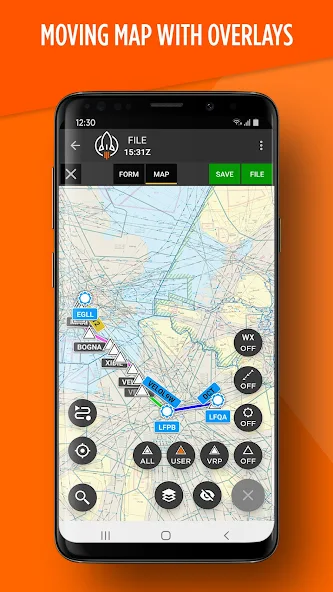
MOVING map NAVIGATION FEATURES:
- Utilize a powerful globe view with intuitive Zoom controls.
- Display real-time Lat/Lon Coordinates.
- Monitor your Track.
- Track your Speed.
- Display your current position and direction of flight.
- Overlay Enroute Upper / Lower Charts with Flight Details.
- Display waypoints, airways, and airports.
- Visualize terrain elevation.
- Select and display Planned Routes.
FLIGHT MANAGEMENT FEATURES:
- Easily Delay Flight Plans.
- Cancel Flight Plans when necessary.
- Copy Flight Plans for repetitive routes.
- Check Flight Status (RQP).
- Add SLOT details for managed flight operations.
- Make Last Minute Changes, including Fuel and PAX Loading adjustments.
- Display current METAR weather reports.
- Display current NOTAM notices.
AIRPORT PLATE FEATURES:
- Search through more than 65,000 documents and airport plates.
- Access an extensive library of countries for browsing and viewing.
(Requires a paid RocketRoute Membership)
- Enjoy crystal-clear PDF quality.
- Benefit from intelligent document naming conventions.
- Documents are organized into handy folders: APPROACH, SID, STAR, TAXI, and AIP.
- Perform airport searches both online and Offline.
- Search by Airport Name or ICAO identifier.
- Lock the view for Approach procedures.
GENERAL FEATURES:
- Adjust Brightness levels for optimal viewing.
- Engage Scroll lock for stable map viewing.
- Use in Landscape or portrait view.
COUNTRY COVERAGE:
- Access Worldwide Upper and Lower Navigation Data for a 12-month period.
- The app includes access to a wide range of Airport Plates.
AIRPORT PLATES:
RocketRoute provides numerous countries bundled with Membership (marked CAA).
Branded Plates are available as an additional in-app purchase.
USA - FAA IFR
Europe - EAD IFR
caribbean - CAA IFR+VFR
Brazil - CAA IFR+VFR
South Africa - CAA IFR
Central Africa - CAA IFR+VFR
Tunisia - CAA IFR
Algeria - CAA IFR+VFR
Sudan - CAA IFR
Morocco - CAA IFR+VFR
UAE - CAA IFR
Iran - CAA IFR
Israel - CAA IFR
Germany - DFS VFR
UK - Pooleys VFR
Ireland - Pooleys VFR
Swiss - SkyGuide VFR
Austria - Rogers VFR
Italy - Avio Portolano VFR
Czech + Slovakia - Avion VFR
Hungary - Manual VFR
noteS:
- Moving map functionality requires Android devices with gps Connection or pairing with a 3rd party GPS Device.
- Flight Planning and Route Planning require an active Internet connection.
- Once synced, the App can be used for Offline access.
- Some VFR Airport Documents may require an additional RocketRoute subscription.
- Flight Plans can only be filed by authorized pilots/dispatchers and ARE NOT to be used for any non-aviation purposes.
What's New
With this release we have focused on improving the ease of use and simplicity of the map controls. We've reduced button clutter, and made it intuitive to understand how sub-menus appear, and how to see if weather, airways, waypoints or airports are activated. The aircraft position can now be locked to the center of the map when in flight.


