
eDrawings
Download ApkeDrawings Application Screenshots


eDrawings AI Editor's Review
eDrawings is a professional tool for viewing and sharing 3D models and 2D drawings. With intuitive features and in-app purchase options for advanced functionality, it enhances collaboration and design communication for engineers and designers.
Comprehensive Analysis
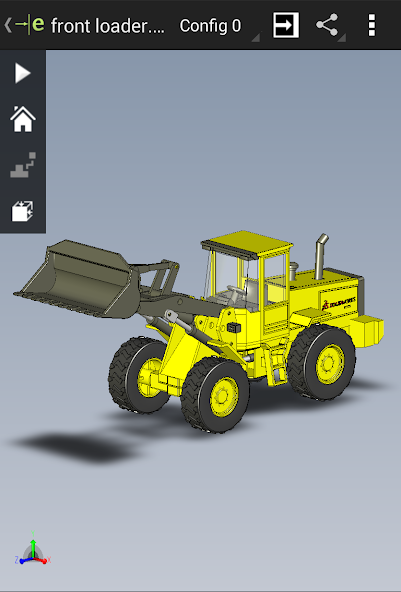
eDrawings is a mobile application designed for viewing and sharing 3D models and 2D drawings created with CAD software. It allows users to open, zoom, pan, and rotate designs on their mobile devices. The app supports various file formats and offers markup tools for adding comments and annotations. With optional in-app purchases, users can unlock professional features such as measurement tools and section views. The app provides a convenient way to review and collaborate on designs while on the go, although performance can be impacted by large or complex models.
Key Advantages
- Enables easy viewing of 3D models and 2D drawings on mobile devices.
- Facilitates collaboration by allowing users to share and mark up designs.
- Offers in-app purchase for professional features, extending functionality as needed.
Areas for Improvement
- In-app purchases can be expensive for some users.
- Performance may vary depending on the complexity of the model and device capabilities.
The Description of eDrawings
Site Editorial Commentary:Experience and share your SolidWorks designs on your Android® phone and tablet.
edrawings Pro offers advanced features through in-app purchase, enhancing its capabilities as a professional-grade CAD viewer.eDrawings® stands out as a premier CAD viewer available on Android phones and tablets, providing seamless access to native eDrawings files alongside native SolidWorks® parts, assemblies, and drawings.
This email-enabled communication tool revolutionizes the way product design information is shared. Effortlessly load and send files via email, fostering effective collaboration among all stakeholders in product development. Even individuals without extensive CAD software experience can easily interpret and understand intricate 2D and 3D designs.
Intuitive multi-touch gestures enable effortless panning, zooming, and rotation of models. eDrawings extends its support to drawing sheets and exploded views derived from eDrawings files published within SolidWorks®.
Key Features:
* Enjoy an intuitive and user-friendly interface for seamless navigation.
* Open a wide array of 3D (EASM, EPRT, SLDASM, SLDPRT, IGES, IGS, JT, STEP, STP, IFC) and 2D (EDRW, SLDDRW, DWG, DXF) file formats, along with associated files, from diverse sources including email attachments, cloud storage services (Dropbox™, SkyDrive®, Google Drive, Hightail®, and others), web and FTP sites, and network folders.
* Utilize multi-touch gestures to zoom, pan, and rotate your 2D or 3D CAD data with ease.
* Animate 3D standard views for enhanced visualization.
* Seamlessly browse through your 2D drawing sheets.
* Immerse yourself in full-screen design viewing and double-tap to optimize the fit on your screen.
* Benefit from included sample files to get started quickly.
Unlock the full potential of eDrawings by upgrading to eDrawings Pro via In-app purchase, gaining access to powerful new functionalities:
* Precisely measure your designs, including distances, angles, lengths, point-to-point measurements, and more.
* Dynamically explore cross sections of your models in XY, YZ, or ZX directions from either side, with the ability to effortlessly drag the cross-section plane.
* Create detailed markups within your designs, incorporating text notes and freehand annotations.
* Share marked-up eDrawings files with colleagues for review and collaborative feedback. All markups, along with their history, are securely saved within the eDrawings file.
Thank you for choosing eDrawings! We value your feedback and encourage you to review the app. Your input is crucial to our continuous improvement. For any suggestions or support inquiries, please contact us at [email protected].
Known Issue with Augmented Reality:
On certain devices, the Get Marker buttons may be clipped and inaccessible. You can now access these buttons through the settings menu in the top right corner while in AR mode.
For further details, please visit http://www.solidworks.com or http://www.edrawingsviewer.com


