
XMReality 6
Download ApkXMReality 6 Application Screenshots


XMReality 6 AI Editor's Review
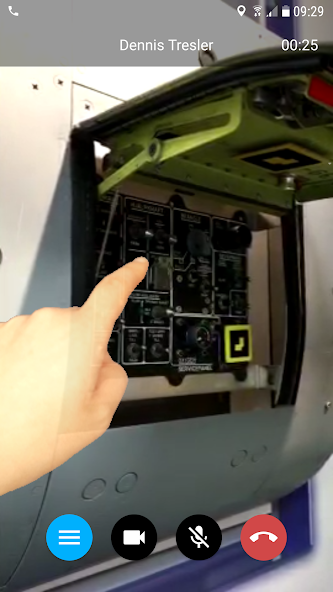
XMReality 6 enhances remote support with AR guidance. Experts can remotely assist field technicians using live video, hands-free communication, and augmented reality annotations for efficient problem-solving and reduced downtime.
Comprehensive Analysis
XMReality 6 provides a robust platform for remote visual assistance. The application enables experts to guide field technicians through complex tasks using augmented reality annotations overlaid on a live video stream. Hands-free communication ensures technicians can focus on the task at hand. The user interface is intuitive, facilitating easy collaboration. While performance is generally reliable, a strong internet connection is necessary, and older devices might struggle with AR processing.
Key Advantages
- Real-time AR guidance for remote assistance
- Hands-free communication for on-site technicians
- Improved first-time fix rates and reduced travel costs
Areas for Improvement
- Requires a stable internet connection for optimal performance
- AR features may be demanding on older devices
The Description of XMReality 6
Site Editorial Commentary:XMReality Remote Guidance
Enhance your team's expertise and streamline remote assistance with XMReality 6. This innovative application empowers your colleagues to provide real-time guidance, showing you precisely how to perform tasks, as if they were right there with you.**Key Features:**
* **Real-time Voice and Video Communication:** Experience seamless, high-quality audio and video for clear and effective communication.
* **Augmented Reality (AR) Capabilities:** Utilize AR features for enhanced guidance and visualization, making complex tasks easier to understand.
* **Interactive Tools:** Save screenshots, send real-time gestures, and utilize a cursor in the picture for precise instruction.
* **Text chat:** Communicate via text for additional clarity and support.
* **Session recording:** Record and save sessions for training, documentation, and future reference.
* **Optimized for Challenging Environments:** XMReality 6 is designed to perform well even in low-bandwidth conditions, ensuring synchronized sound and video without delays.
* **Versatile Hardware Support:** Compatible with a wide range of devices, from ordinary smartphones to smart glasses and rugged tablet casings, adapting to various operational needs.
**note:**
To use the app, you need pre-existing credentials (username, etc.).
**Important:** XMReality Remote Guidance solutions includes VOIP audio. Some mobile network operators may prohibit or restrict the use of VOIP functionality over their network and may also impose additional fees or charges.
What's New
Various bug fixes and improvements.


