
Kids360 – parental control and screen time
Download ApkKids360 – parental control and screen time Application Screenshots


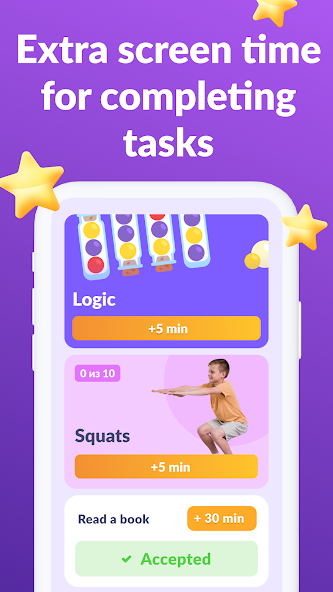


Kids360 – parental control and screen time AI Editor's Review
Kids360 empowers parents with screen time management, app usage control, and location tracking. Stay informed about your child's digital habits and ensure their safety with this comprehensive parental control app.
Comprehensive Analysis
Kids360 is a parental control application designed to help parents monitor and manage their children's digital activity. Key features include screen time limits, app usage tracking, and real-time location monitoring. The app provides detailed reports on app usage, allowing parents to identify potential issues. While the interface is generally user-friendly, some users may find the extensive features overwhelming. Overall, Kids360 offers a robust set of tools for parents seeking to ensure their child's online safety and well-being.
Key Advantages
- Effective screen time management features
- Real-time location tracking for child safety
- Detailed app usage statistics and control
Areas for Improvement
- Potential for children to feel overly monitored
- Subscription required for full functionality
The Description of Kids360 – parental control and screen time
Site Editorial Commentary:Parental control: child monitoring app, screen time control, GPS child trackerа
kids360: Parental Control is a comprehensive solution designed to help parents manage their children's device usage and ensure their online safety. It offers features like screen time limits, app locking, usage time tracking, and access to educational games, promoting a healthy balance between screen time and other activities. Keep your family safe, manage device usage effectively, and foster happy, well-adjusted kids with this powerful tool.The Kids360 and Alli360 apps work in tandem to provide a robust set of parental control features:
**App Usage Limiter:** Set specific time limits for distracting apps, games, and social media platforms on your child's phone. This feature functions as a child lock, effectively managing screen time and promoting focus on other activities. It enables child lock and kids mode.
**Usage Schedule:** Create a daily schedule that optimizes your child's time for Schoolwork and ensures adequate sleep. The app considers the time spent on games, social media, and entertainment apps, limiting their usage accordingly. Effectively limit phone usage based on a pre-set schedule.
**App Statistics:** Gain insights into your child's app usage habits, identifying which apps they use and for how long. Determine if they are using educational apps or spending time on games during class.
**Screen Time Monitoring:** Track the total time your child spends on their phone and identify the apps that consume most of their attention. Enable kid control features to proactively manage their digital habits.
**Stay in Touch:** Ensure that essential communication apps for calls, texts, and transportation are always accessible, so you can maintain contact with your child.
Kids360 is a child monitoring app designed to prioritize your child's safety and assist parents in managing screen time. With our mobile app tracker, you'll always be informed about your child's phone usage, including the games they play and the apps they use most frequently.
The app's use is transparent and requires the child’s consent; it cannot be installed secretly. Personal data is handled with strict adherence to legal requirements and the GDPR policy.
To begin using Kids360, install Alli360 on your child's smartphone. This app will run in app tracker mode and cannot be easily deleted by your child. You'll gain access to your child's app usage data once both apps are fully configured and all necessary permissions are granted. After setup, you can adjust screen time limits and customize other parental control settings.
Getting Started with Kids360:
1. Install Kids360 on your phone.
2. Install Alli360 on your child’s phone and enter the code displayed in Kids360.
3. Grant the necessary permissions for monitoring your child's smartphone within the Kids360 app.
You can monitor your child's screen time for free once their device is connected. Advanced time management features, such as scheduling and app blocking, are available during a trial period and with a paid subscription.
The Kids360 parental control app requests the following permissions:
1. **Display over other apps:** To block applications when time limits are reached.
2. **Special access:** To enforce screen time limits.
3. **Access to usage data:** To collect statistics on app usage time.
4. **Autorun:** To ensure the app tracker remains active on your child's device.
5. **Device administrator:** To prevent unauthorized deletion and maintain kids mode functionality.
For technical assistance, contact Kids360's 24/7 support team via email at [email protected].
What's New
Have you noticed that we're constantly updating Kids360? We do our best to develop the fastest and most reliable app for you!


