
Barcode/NFC Scanner Keyboard
Download ApkBarcode/NFC Scanner Keyboard Application Screenshots



Barcode/NFC Scanner Keyboard AI Editor's Review
Barcode/NFC Scanner Keyboard seamlessly integrates barcode and QR code scanning directly into your keyboard. Streamline data entry by scanning codes and instantly inputting the data into any app. A convenient tool for inventory management, retail, and data collection.
Comprehensive Analysis
Barcode/NFC Scanner Keyboard offers a unique approach to data entry by embedding barcode and QR code scanning functionality within a standard soft keyboard. Users can effortlessly scan codes and instantly insert the data into any application, such as spreadsheets, forms, or text editors. The keyboard supports both barcode and NFC scanning, catering to a variety of data capture needs. While the integration is seamless, scanning performance can be impacted by factors like lighting and code quality. Overall, it's a convenient tool for streamlining data entry workflows.
Key Advantages
- Seamless integration of barcode/QR code scanning into a soft keyboard.
- Direct data input into any app, eliminating manual typing.
- Supports both barcode and NFC scanning for versatile data capture.
Areas for Improvement
- May require specific permissions for camera and NFC access.
- Scanning accuracy can be affected by lighting conditions and code quality.
The Description of Barcode/NFC Scanner Keyboard
Site Editorial Commentary:Keyboard Which Scans Barcodes, QR Codes, Text/OCR and NFC Tags into Any App
Transform your Android device into a powerful data input tool with the innovative "Barcode/NFC scanner keyboard"! This soft keyboard seamlessly integrates barcode, QR code, text (OCR), and NFC tag scanning capabilities directly into any app on your device. With a single tap, activate the integrated scanners and watch as the scanned data instantly populates within your target application, just as if you were typing manually. Enjoy unparalleled compatibility – it works flawlessly with virtually any target app without requiring any modifications.**TIME SAVING**
This keyboard is engineered to save you valuable time and effort! It significantly reduces manual typing and eliminates the risk of input errors. Say goodbye to tedious copy/paste operations; now you can effortlessly scan barcodes, QR codes, texts, and NFC tags without ever switching apps. The intuitive keyboard layout mirrors the familiar design of the standard Android keyboard, ensuring a seamless and immediate transition.
**VERSATILE**
This Scanner Keyboard is incredibly versatile, making it an ideal solution for diverse applications. It's ready for volume licensing, optimized for bulk deployment across organizations, and highly configurable to meet virtually any specific requirement. It is perfectly suited for the demands of commercial, industrial, logistics, and supply chain environments.
**BARCODE SCANNING**
Choose between two integrated camera barcode scanners to suit your device and needs. The traditional barcode scanner is an excellent choice for older phone models, while the advanced barcode scanner offers selective barcode scanning – a highly useful feature when multiple barcodes are visible within the scan view, allowing you to target the specific barcode you need.
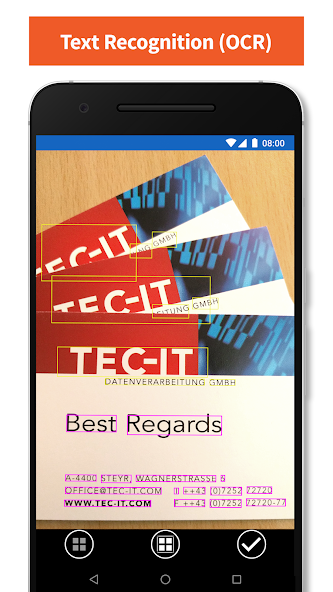
**TEXT RECOGNITION (OCR)**
The integrated text scanner (OCR) empowers you to convert camera images into editable text within seconds. It automatically detects Latin-based text within pictures of documents and instantly inserts it into your target application.
**FEATURES**
* Keyboard with a Modern layout, voice recognition, spelling suggestions, and multi-language support
* Two camera barcode scanner engines to choose from, optimizing for different devices.
* Selective barcode scanning: simply tap the barcode you want to capture.
* OCR text scanner: converts images to Latin-based text for easy input.
* Integrated NFC tag reader for instant NFC data capture.
* Quick front/back camera switching and convenient flashlight support.
* Autofocus support ensures clear and accurate scans.
* Works seamlessly with almost any target app.
* Swipe to effortlessly change keyboard layouts.
* Configurable auto-scan function automatically invokes the scanner.
* Configurable scanner keys for a personalized experience.
* Supports both one-by-one and batch mode scanning.
* Macro support / Quicktext for frequently used phrases.
* Multiple licensing options to suit your needs.
* Ready for bulk deployment across your organization.
* And much more...
**COMPATIBILITY / LIMITATIONS**
The Scanner Keyboard is compatible with Android 4.0 (Ice Cream Sandwich) and later. The advanced barcode scanner and OCR text scanner are supported on Android 5.0 (Lollipop) and higher and require Google Play services to be installed. The keyboard supports common input languages and layouts, and its layout automatically adapts to your Android device's system settings.
**BULK/ENTERPRISE LICENSING, OEM VERSIONS**
For organizations with volume licensing needs, TEC-IT offers a bulk-license version of the app (no Google account required). Customized or OEM versions, including seamless integration with hardware scanners, are available upon request. Please contact [email protected] for more information.
**FREE DEMO**
The free trial version displays a demo hint at irregular intervals. Upgrade to the unlimited version via in-app purchase to remove this limitation.
**SUPPORT**
For any problems, questions, or requests, please contact [email protected], TECITSupport (Skype), or visit https://www.tec-it.com/bsk.
Terms of use and privacy: https://www.tec-it.com/download/PDF/TEC-IT_AGB_EN.pdf


