
PlanGrid
APK 다운로드PlanGrid 앱 스크린샷


PlanGrid AI 편집자의 리뷰
PlanGrid, now part of Autodesk, streamlines construction project management. It offers real-time collaboration, document management, and progress tracking, enhancing efficiency and reducing errors. A top choice for construction professionals.
종합 분석
PlanGrid, now integrated with Autodesk, is a powerful construction management application designed to improve project workflows. It excels in document management, enabling teams to access and manage blueprints, specifications, and other critical documents from the field. Real-time collaboration features facilitate communication and coordination among stakeholders. The app's progress tracking tools provide valuable insights into project status, helping to identify and resolve potential issues promptly. While the cost may be a barrier for some, PlanGrid offers substantial benefits in terms of efficiency and accuracy.
주요 장점
- Seamless document management and version control
- Real-time collaboration for all project stakeholders
- Accurate progress tracking and reporting capabilities
개선 영역
- Can be expensive for smaller construction firms
- Steep learning curve for new users unfamiliar with the interface
설명 PlanGrid
Site Editorial Commentary:#1 construction management app! Access punch lists, reports, blueprints & more!
PlanGrid is the best-in-class construction management app designed for seamless integration with Autodesk Build, Autodesk BIM Collaborate, Autodesk Docs, and PlanGrid itself. It empowers teams working on over 2.5 million projects to efficiently manage their construction endeavors.Construction teams can harness the power of Autodesk Construction Cloud's streamlined automation, intelligent connections between various tools, and comprehensive workflows to ensure the delivery of high-quality construction projects, completed on schedule and within budget.
The Autodesk Construction Cloud mobile app extends the capabilities of Autodesk Build, Autodesk BIM Collaborate, Autodesk Docs, Revit, Navisworks, PlanGrid, and AutoCAD to the field. It offers robust construction and document management, enhanced collaboration tools, and readily accessible project data from any location.
Autodesk Construction Cloud is specifically tailored for the entire project team, including:
• the superintendent overseeing quality control on-site
• the project manager monitoring real-time progress
• the BIM team proactively identifying potential issues before installation
• the architect conducting site inspections
• the owner leveraging construction data and as-builts to optimize daily operations
Here’s how PlanGrid streamlines construction management:
CONSTRUCTION COLLABORATION
+ Issues
Centralize issue tracking from design to handover. Expedite resolution by assigning due dates and responsible parties, and easily reference photos, associated files, and RFIs.
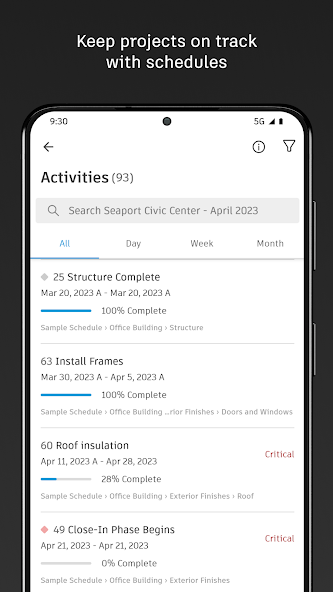
+ Schedule
Maintain project momentum with a centralized schedule. View schedules across different timeframes, filter by critical items, review dependencies, and evaluate schedule suggestions.
+ Forms
Capture essential data using customizable forms tailored to project requirements. Develop a comprehensive safety program or monitor daily checklists.
+ Assets
Seamlessly manage the lifecycle of project assets from design to commissioning and handover. Track, store, and connect assets to other workflows.
+ Meeting Minutes
Stay organized for upcoming meetings by creating agendas. Link relevant references such as issues, models, RFIs, or photos. Monitor outstanding items and ensure timely follow-up, all from the field.
FILE MANAGEMENT
+ Sheets and drawings
Quickly access the latest drawings and shared plans with fast downloads and dynamic search. Compare, share, and markup sheets directly from the field to eliminate guesswork during installation.
+ Models
Accelerate critical decision-making with access to 3D models in the field. View installation details and effortlessly navigate single or multi-trade models for confident building. Supports Revit and AutoCAD file types, including RVT, DWG, NWC, IFC, NWD, and more.
QUALITY CONTROL
+ RFIs
Minimize data loss with integrated RFI management. Connect RFIs throughout the project lifecycle to reduce redundant work.
+ Submittals
Keep all relevant submittal information readily available. Use search to quickly locate necessary submittals to view progress and next steps.
+ Photos
Utilize photos to track progress and link references to issues, RFIs, schedule activities, and more. Employ autotags and filters to quickly find specific photos.
Here's what our customers are saying:
“The ability to access 3D models from the field eliminates confusion and allows us to come to a real-time resolution for any issues onsite. This capability reduces risk and provides cost and time savings while ensuring we deliver high-quality projects to our clients.”
Briana Mitchell, Project Manager, Boldt Company
“We have about 460 field employees and for them to access documents in real-time directly on their iPhone or their iPad is priceless.”
Ken Mabe, Director of Field Operations, Eckardt Group
“I’m excited about being able to effortlessly tag a snippet from a drawing onto an RFI and immediately assign responsibilities and track how the project team interacts with a particular issue or RFI. The ability to track an issue’s progression in real-time helps us manage any roadblocks immediately.”
Amy Kozlowski, Project Manager, Herrero Builders
새로운 소식
We're continuously releasing updates to improve the app and provide new tools. Please stay up to date to make sure you're getting the best PlanGrid experience.
We'd love to hear from you — send comments and suggestions to [email protected]. Your input helps improve PlanGrid.


