
Smart Note
APK 다운로드Smart Note 앱 스크린샷



Smart Note AI 편집자의 리뷰
Smart Note is a simple and efficient note-taking app perfect for quick memos and organizing thoughts. Its user-friendly interface makes it easy to create, edit, and manage notes effortlessly. Ideal for students, professionals, and anyone needing a handy digital notepad.
종합 분석
Smart Note offers a streamlined note-taking experience. The app excels at quick note creation and easy organization. Users can create, edit, and delete notes with minimal effort. While the interface is clean and user-friendly, the app lacks advanced formatting options and features such as cloud synchronization or collaboration capabilities. It is best suited for users needing a basic and reliable digital notepad without the bells and whistles.
주요 장점
- Simple and intuitive interface
- Efficient note creation and management
- Lightweight and fast performance
개선 영역
- Limited formatting options
- Lacks advanced features like collaboration or cloud sync
설명 Smart Note
Site Editorial Commentary:Easy and fast notepad app with todo, backup, password, dark mode, reminders
Smart note is a succinct and efficient notepad application designed to help you effortlessly capture and organize your ideas, thoughts, and daily tasks.With Smart Note, managing your schedules and notes becomes a seamless experience. It offers a quick and simple notepad editing interface, making it ideal for jotting down notes or creating to-do lists. Taking notes has never been easier!
**TAKE NOTES**
Smart Note provides versatile ways to capture your thoughts and ideas. Enhance your notes by attaching photos or relevant files for easy access and reference.
**VOICE NOTES**
Capture fleeting ideas and inspirations instantly with the voice recording feature. Smart Note allows you to record audio notes, ensuring you never miss a moment of brilliance.
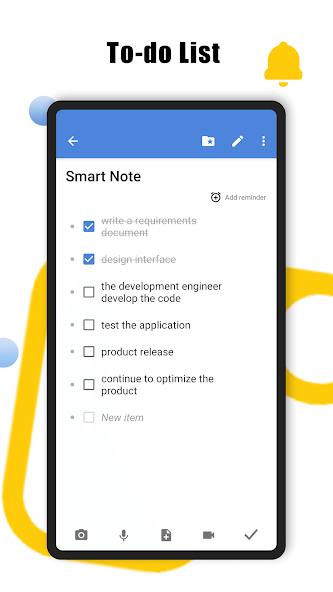
**TO-DO LIST**
Stay organized and on top of your tasks by creating and managing to-do lists within Smart Note. Keep your work and personal life in perfect order.
**BACKUP DATA**
Protect your valuable notes with the easy-to-use backup feature. Choose to back up your data to Google Drive for cloud storage or opt for local backups for added security.
**DARK modE**
Customize your viewing experience with the dark mode option. Easily switch to dark mode in the settings to ensure the interface is consistent with your system preferences, reducing eye strain in low-light environments.
**reminder**
Never miss an important deadline or event. Set reminders within your notes to keep track of crucial dates and tasks.
**PASSWORD PROTECTION**
Safeguard your privacy with password protection. Prevent unauthorized access and keep your sensitive information secure.
**HOME SCREEN WIDGET**
Access your notes quickly and easily with Smart Note's convenient home screen widgets. Add widgets to your home screen for instant access to your most important information.
**CONVERT TO PDF**
Easily convert your notes to PDF format with Smart Note's built-in PDF conversion feature. Save your notes as PDFs and store them in your preferred location.
**PRINT**
Need a hard copy? Smart Note seamlessly integrates with your system printer, allowing you to quickly print your notes and share them with others.
**CUSTOMIZE**
Personalize your Smart Note experience with a wide range of customization options. Choose your favorite color scheme, date format, and more to create a unique and engaging interface!
Smart Note is 100% FREE to use. Download now and boost your productivity without any cost!
It's a colorful and feature-rich notepad designed to make note-taking a breeze. Start using Smart Note today!
새로운 소식
Fix the dark mode bug Optimized application as always


