
EssentialPIM
APK herunterladenEssentialPIM Anwendungsbilder



EssentialPIM AI Redakteursbewertung
EssentialPIM for Android brings the powerful personal information management from Windows to your mobile device. Manage calendars, contacts, tasks, notes, and passwords in a synchronized, user-friendly app. Stay organized on the go with this versatile tool.
Umfassende Analyse
EssentialPIM for Android is a robust PIM application designed for users already familiar with its Windows counterpart. It offers a comprehensive suite of tools for managing calendars, contacts, tasks, notes, and passwords. The app's strength lies in its ability to synchronize data seamlessly with the Windows version, ensuring consistent access to information across devices. While the interface is generally user-friendly, new users might find the initial setup process a bit complex. Overall, EssentialPIM provides a powerful and organized experience for managing personal information on the go.
Hauptvorteile
- Seamless synchronization with Windows version
- Comprehensive suite of PIM tools in one app
- User-friendly interface for easy navigation
Verbesserungsbereiche
- Initial setup can be complex for new users
- Occasional synchronization delays reported
Die Beschreibung von EssentialPIM
Site Editorial Commentary:Powerful and full-featured personal information manager.
EssentialPIM is the Android version of the highly acclaimed Windows platform organizer, designed to streamline your life by managing calendars, Tasks, notes, Contacts, and Passwords, all interconnected in one convenient package.- **Seamless Data Synchronization**
Effortlessly synchronize your data with the Windows version of EssentialPIM. Benefit from synchronization with Google Calendar, Google Tasks, Google Drive (for Notes and Passwords), and Google Contacts, ensuring your information is always up-to-date across all your devices.
- **Versatile Calendar Views**
Enjoy a range of colorful and intuitive calendar views, including day, week, week agenda, month, year, and agenda views, making scheduling and planning a breeze.
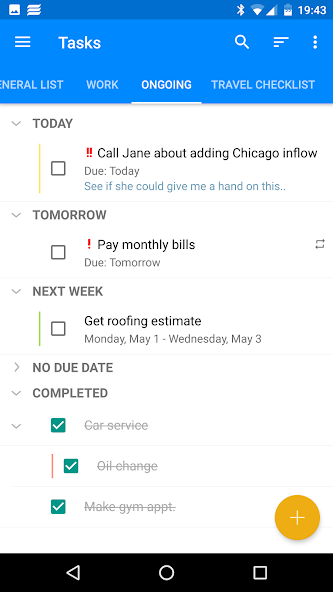
- **Hierarchical Task Management**
Organize your tasks with a flexible, hierarchical structure, allowing you to create multiple trees with sub-trees and leaves, ensuring efficient task management.
- **Multi-Level Notes Organization**
Utilize a tree-like, multi-level notes structure with multiple views for quick preview, management, and easy location of your data.
- **Convenient Contact Management**
Keep your contacts neatly organized with a wide selection of fields and an unlimited number of contact groups that can be arranged hierarchically.
- **Secure Password Storage**
Protect your sensitive information with a self-locking mechanism that offers a secure and convenient way to store all your passwords and other confidential data.
- **Functional Widgets**
Enhance your home screen with beautiful and functional widgets (some available through in-app purchase) for Calendar (agenda and month views), Tasks, Notes, and quick addition of new EPIM items. Create shortcuts for EPIM modules for faster access.
- **Tag-Based Data Organization**
Organize your data effectively by creating and assigning tags to any items within the app, improving information flow and accessibility.
- **File Attachments**
Store external files attached to items like appointments, notes, and tasks, keeping all necessary resources readily available.
- **App-Wide Password Protection**
Secure your personal information with password and/or fingerprint protection. Data is encrypted using a random 256-bit AES key for maximum security.
- **Data Backup and Restore**
Easily back up your EssentialPIM data to your device or any online service and restore it to any Android device.
Key features:
- Comprehensive modules: Calendar (day, week, week agenda, month, year and agenda views), Tasks (custom fields, hierarchical structure), Notes (tree-like multilevel structure), Contacts (groups and unlimited custom fields), and Passwords (secure, self-locking mechanism).
- Customizable widgets: Calendar (month and agenda views), Tasks, Notes, quick add new items, and module shortcuts.
- Seamless synchronization with Win EPIM via EPIM Cloud or directly over Wi-Fi, cellular networks (4G/LTE), Bluetooth, or USB cable.
- Automatic synchronization with Google services: Calendar, Tasks, Drive (for Notes and Passwords), and Contacts.
- Tagging system for enhanced data organization and usage scenarios.
- Ability to attach files to any types of items.
- Password and/or fingerprint lock for security.
- Data backup/restore options.
- Fast and responsive user interface with light and dark themes.
- Ad-free experience.
EssentialPIM Pro (paid version) exclusive features:
- Premium widgets: Calendar (Agenda and Month views), Tasks, and Notes widgets.
- Task display in Calendar.
- Lock time zone setting for Calendar events.
- Automatic backup uploads to Google Drive.
- Password protect the whole app
Support and feedback:
For assistance, questions, or suggestions, contact us via the Send feedback link in Settings->About or email us at [email protected].
translation:
Help us translate EssentialPIM into your language! Join our translation process or review existing translations for accuracy. Contact us at [email protected] to participate. Active contributors receive free EssentialPIM Pro licenses for Android and Windows.
Was ist neu
- Notes can now be sorted by their creation date - Some improvements related to backup and restore procedures - Fixed issue when deleted tasks were still shown on the calendar’s widget - Improved how series of recurring events are shown for assigned contacts - Dark theme for widgets should be working on all devices - Couple of minor bug fixes and improvements


