
Shortcutter
Download ApkShortcutter Application Screenshots
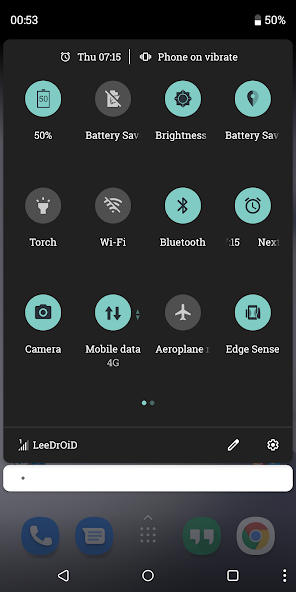


Shortcutter AI Editor's Review
Shortcutter empowers you to customize your Android Quick Settings panel. Add custom toggles, app shortcuts, and system actions for instant access. Streamline your Android experience with this powerful customization tool. A must-have for power users!
Comprehensive Analysis
Shortcutter is an Android application designed to enhance the Quick Settings panel. It allows users to add custom tiles for various actions, including launching apps, toggling system settings, and executing custom tasks. The app offers a wide range of customization options, enabling users to tailor their Quick Settings to their specific needs. While some advanced features might require root access, the app significantly improves workflow and provides a more efficient Android experience. The interface is user-friendly, although the initial setup might seem a bit overwhelming for novice users. Overall, Shortcutter is a powerful tool for Android power users looking to optimize their device usage.
Key Advantages
- Highly customizable Quick Settings tiles
- Supports app shortcuts and system actions
- Improves Android workflow and efficiency
Areas for Improvement
- May require root access for some features
- Initial setup can be slightly complex
The Description of Shortcutter
Site Editorial Commentary:Access Settings, Apps & Shortcuts from your Quick Settings Pull-Down or Sidebar
Shortcutter is the ultimate Android Quick Settings companion, functioning as a versatile Tile provider, Shortcut provider, Widget provider, and Quick Access Toolbox. It grants you instant access to Apps, Contacts, Websites, Settings, actions, Activities, Shortcuts, and Services directly from your notification shade, home screen, or a convenient side bar.It's designed to be user-friendly and offers a robust free feature set, with additional functionalities available at a minimal cost. The application is also under active and constant development.
Access hundreds of shortcuts from your home screen launcher, the system quick settings pull-down, the Shortcutter always-on-top Side Bar/Launcher, or via Shortcutter's Widgets.
Please refer to the included guides, and feel free to contact the developer for assistance if needed :)
Shortcutter Side Bar / Side Launcher:
- A Floating Toolbox or Swipe-out Side Bar that remains always accessible on top of other apps.
- Position it on the right, left, or bottom edge of your screen for optimal convenience.
- Access over 100 shortcuts, including up to 40 Custom tiles, providing direct access to Apps, Activities, System Shortcuts, Direct Call, Direct Dial, and Web Links!
- Personalize your experience by creating your own theme, layout, and design.
System Quick Settings Pull-Down Tiles:
How to add them: https://youtu.be/uaPtqfXkIkE
* A wide array of additional Quick Settings tiles & services are available for the standard user.
* Advanced users can benefit from additional tiles with Settings Secure access.
* Root users gain access to even more powerful tiles.
Exposed Launcher Shortcuts (micro apps):
- Shortcutter Exposed Launcher Shortcuts allow you to toggle settings & services directly from your app Drawer, home screen, HTC Edge Sense, Tasker, and more!
A number of tiles & services require elevated permissions:
* Admin - Screen Lock.
* Accessibility - Secure Activity Detection, Power Menu, Recent Apps & Split Screen, Secure Power Menu & detecting volume key presses for Volume Panel.
Some of the Shortcuts/Tiles/Toggles available:
- Auto Sync
- App Drawer/Folder
- Bluetooth
- Battery Percentage
- Brightness Preset
- Screen Cast
- Launch camera
- Clipboard Editor
- Clicker/Counter
- Countdown Timer
- Dice
- Data Usage
- Data Speed
- Expand Quick Settings
- Expand Notifications
- Flashlight
- Floating Calculator
- File Browser
- Font Scale
- keyboard/IME Selector
- Location mode: Off, Device Only, Battery Saving & High Accuracy*
- In Ear Audio
- Notification Log
- Mobile Data (Non direct)
- Multi Window
- Mute Media
- My Location
- My Play Apps
- New Tweet
- New email
- Next Alarm
- Night Light/Desk Clock
- NFC*
- Power Menu
- Play/Pause music
- Power Saver*
- Quick SMS
- Quick reminder
- Recent Apps, Back & Home buttons.
- RAM Usage
- Rounded Corners
- Ring Mode
- Screen Wake AKA Caffeine
- Screen Record
-- Custom video profiles
- Screenshot - High Res
--- Custom save location for screenshots & recordings.
--- Notifications with View, Share & Delete actions
- Screen Timeout
- Screen Brightness Mode
- Speaker Audio
- Screen Filter AKA Night Mode
- Screen Lock - *Requires Device Admin*
- Screen Orientation
- Stopwatch
- Tethering & HotSpot
- Touch Vibration
- Custom Pie style volume Panel
- Unknown Sources
- Web Search
- WiFi
- WiFi Hotspot
- Assistant
- vpn
- weather
- SystemUI Tuner
- Custom Tiles - Add a shortcut to any application, activity, shortcut on your device, assign a web address/search term, direct dial, direct message or shell command (Root).
With Settings Secure Access (Enabled with a PC command):
- ADB
- Data Roaming
- Ambient Display
- Heads Up Notifications
- Immersive Mode/Expanded Desktop
- Keep Screen On While Charging
- Monochrome
Additional ROOT ONLY Tiles:
- Mobile Network Mode
- Advanced Power Menu
- Assign shell commands to custom tiles
Add an extra layer of security to your quick settings pulldown, replace your existing tiles with Shortcutter tiles & enable the Lock Shortcutter Pull-Down Tiles option!
Some functionality may be impacted by manufacturer changes.
What's New
v7.8.0:
* Fix crash in rounded corners & screen filter.
v7.7.9:
* Improved colour picker.
* Add sidebar/toolbox corner scale option.
* Improve sidebar background dimming.
* Make background dim level adjustable.
* Screen Lock shortcut now uses accessibility on Android 9+.
* Allow full sidebar/toolbox transparency.
* Ensure sidebar refreshed correctly when using designer.
* Allow manual adjustment for Sidebar trigger.
* Bug Fixes.


