
radio watch sync
Download Apkradio watch sync Application Screenshots
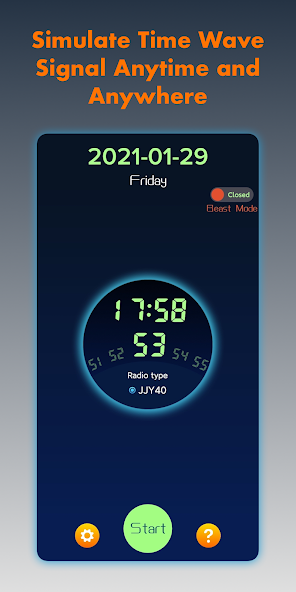


radio watch sync AI Editor's Review
"Radio Watch Sync" aims to improve the synchronization of Casio G-Series radio watches. It addresses issues where watches fail to automatically sync time, offering potential solutions for accurate timekeeping. User experience may vary depending on environmental conditions and watch model.
Comprehensive Analysis
Radio Watch Sync attempts to solve the common problem of Casio G-Series watches failing to synchronize with radio time signals. The app likely provides tools or instructions to improve the synchronization process. While the concept is valuable for users experiencing timekeeping inaccuracies, its effectiveness seems heavily dependent on factors like signal strength and location. User reports may be inconsistent due to varying environmental conditions and watch models. Further testing is needed to determine its reliability across diverse scenarios.
Key Advantages
- Potentially resolves radio watch synchronization problems.
- Specifically designed for Casio G-Series watches.
- Offers a solution for accurate timekeeping.
Areas for Improvement
- Effectiveness dependent on environmental factors.
- User experience can vary based on watch model.
The Description of radio watch sync
Site Editorial Commentary:sync your radio watch anytime and anywhere
Having trouble synchronizing your Casio G-Series radio watch with time signal stations? This application solves that problem!After extensive research, this app perfectly simulates the timing signal, allowing you to accurately calibrate your radio-conTrolled watch.
Usage Instructions:
1. Maximize your phone's volume.
2. Set your radio-controlled watch/clock to manual wave receiving mode.
3. Tap the "start" button within the app.
4. Position your watch/clock close to your phone's speaker.
5. The synchronization typically takes 3-10 minutes. Please be patient.
Important Considerations:
1. Use the app in a quiet environment to minimize signal interference.
2. Ensure your phone's volume is at maximum. Lower volumes may compromise synchronization.
Key Features:
1. Supports simulation of various Time Wave Signals:
* China BPC
* USA WWVB
* Japan JJY40 / JJY60
* Germany DCF77
* British MSF
2. The exclusive "Beast Mode" offers higher frequency simulation signals for faster synchronization.
Contact Information:
For any questions or assistance, please feel free to contact me:
* QQ: 3364918353
* email: [email protected]


