
EazyType Telugu Keyboard
Download ApkEazyType Telugu Keyboard Application Screenshots


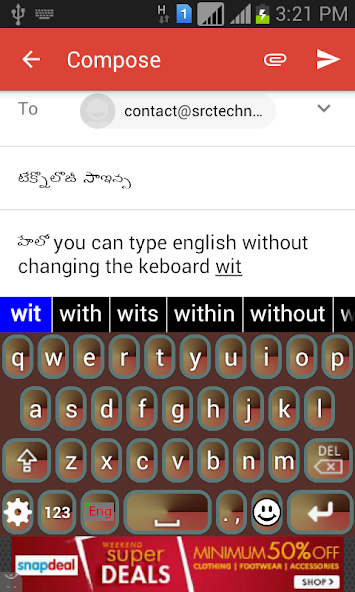


EazyType Telugu Keyboard AI Editor's Review
EazyType Telugu Keyboard simplifies typing in Telugu on mobile devices. It offers a quick and easy way to input Telugu characters, making communication seamless. A user-friendly tool for Telugu speakers.
Comprehensive Analysis
EazyType Telugu Keyboard is designed to make typing in Telugu on mobile devices incredibly easy. It provides a straightforward and intuitive interface for inputting Telugu characters quickly. The keyboard is easy to install and use, streamlining communication for Telugu speakers. While basic functionality is excellent, some users may desire more advanced customization features like themes and layouts. Overall, it's a solid keyboard for simple and efficient Telugu typing.
Key Advantages
- Easy and quick Telugu typing
- User-friendly interface
- Simplifies mobile Telugu communication
Areas for Improvement
- May lack advanced customization options.
- Could benefit from more themes and layouts.
The Description of EazyType Telugu Keyboard
Site Editorial Commentary:EasyType Keyboard Telugu with English and Emoji for fast typing. easy type
EazyType Telugu keyboard makes typing in Telugu on your mobile device incredibly simple.This keyboard offers a quick and easy way to type Telugu, providing an option to insert Emoji icons in your messages on platforms like WhatsApp. It functions as a soft keyboard, allowing you to type in Telugu across various applications such as Gmail, Facebook, and WhatsApp. You can even write blogs in Telugu within your web browser.
This keyboard seamlessly integrates as the default keyboard on Android phones and tablets. There's no need to learn a specific Telugu keyboard layout. Simply type in English, and upon pressing the spacebar, your English word will automatically convert into Telugu script. The keyboard also provides word suggestions to facilitate faster typing.
EazyType includes an English typing option, allowing you to switch between English and Telugu effortlessly with a toggle button.
If you can read "హలో" (Telugu text) on your mobile phone, you can confidently install this application.
EazyType provides an easy way to type in the Indian Telugu language.
Installation:
1. Download and install this application on your phone.
2. Open EazyType's Home screen. You'll find two buttons on the screen: (i) Enable Keyboard (ii) Choose default.
3. Press the 'Enable Keyboard' button and select EazyType to activate the keyboard.
4. Press the 'Choose default' button and select EazyType as your default keyboard.
OR
2. Go to 'Setting'->'Language and Input' and tick the checkbox for EazyType.
3. Go to any text field where you want to type.
4. Drag the Notification bar (at the top of your phone's screen). Tap on 'Select input method'.
Now select 'EazyType' (on a popup).
OR
Long press on the text field and choose 'Input Method'.
Now select EazyType (on a popup).
What's New
Text to Speech support. GIFs, Sticker added. Improved quality of Suggestions for fast typing.
To remove Ad, A complain form option is given.
user can save their custom words in dictionary.


