
图像测量 Image Meter Pro
Download Apk图像测量 Image Meter Pro Application Screenshots
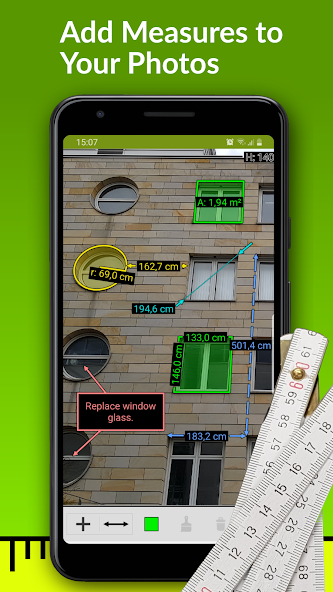


图像测量 Image Meter Pro AI Editor's Review
ImageMeter Pro empowers users to measure lengths, angles, and areas directly within photos. Offering advanced annotation tools and CAD export options, it's ideal for professionals needing precise on-site measurements. Save time and improve accuracy with this powerful mobile tool.
Comprehensive Analysis
ImageMeter Pro allows users to take measurements directly from photographs. It's a useful tool for professionals in construction, real estate, or any field requiring on-site measurements. Users can annotate photos with lengths, angles, and areas. The app supports calibration to improve accuracy, and the Pro version offers CAD export, enhancing its utility for technical applications. While calibration requires initial setup, the app streamlines the measurement process and provides a convenient way to document dimensions directly on images. The user interface is generally intuitive, although mastering all features takes time.
Key Advantages
- Accurately measures lengths, angles, and areas on photos.
- Offers advanced annotation tools for detailed markups.
- Supports CAD export for seamless integration with professional software.
Areas for Improvement
- Requires calibration for accurate measurements, which can be time-consuming.
- The Pro version is needed to unlock all features, which requires a purchase.
The Description of 图像测量 Image Meter Pro
Site Editorial Commentary:Annotate your images with measurements and notes. Supports your Bluetooth laser.
Transform your Android device into a powerful measurement tool with ImageMeter Image Meter Pro. This innovative application allows you to annotate photos with precise length measurements, angles, areas, and text notes, making it a superior alternative to traditional sketches. Ideal for construction planning, interior design, and DIY projects, ImageMeter streamlines the process of incorporating measurements and notes directly onto your images.ImageMeter boasts extensive compatibility with Bluetooth laser distance measurement devices, supporting a wide range of models from various manufacturers (see the full list below). This feature significantly enhances measurement accuracy and efficiency.
One of the standout features of ImageMeter is its ability to measure within an image using a single reference object of known size. This is particularly useful for measuring dimensions in hard-to-reach or difficult-to-measure areas. The app intelligently handles perspective foreshortening, ensuring accurate measurements regardless of the image angle.
**Key Features (Pro Version):**
* Measure lengths, angles, circles, and areas of any shape using a single reference measurement.
* Seamless Bluetooth connectivity with laser distance meters.
* Supports both metric and imperial units (decimal and fractional inches).
* Add detailed text notes to your images.
* Freehand drawing and basic geometric shape creation.
* Export your projects in PDF, JPEG, and PNG formats.
* Adjust image brightness, contrast, and saturation for optimal readability.
* Draw sketches on blank canvases.
* Utilize model-scale mode to display original and scaled sizes for building models.
* Simultaneous display of values in imperial and metric units.
* Context-sensitive cursor snapping for precise drawing.
* Fast and accurate value input with autocompletion.
* Measure pole heights with two reference markings.
**Advanced Annotation Add-On Features:**
* Import and measure drawings at scale from PDF files.
* Add audio notes and picture-in-picture detail images.
* Create measurement and cumulative strings.
* Organize images into subfolders with color codes.
**Business Version Features:**
* Automatic photo uploads to OneDrive, Google Drive, Dropbox, or Nextcloud.
* Access your photos from your desktop PC.
* Automatic image backup and synchronization across multiple devices.
* Generate data tables of your measurements.
* Export data tables for use in your spreadsheet program.
* Incorporate data tables into exported PDFs.
**Supported Bluetooth Laser Distance Meters:**
* Leica Disto D110, D810, D510, S910, D2, X4, D3a-BT, D8, A6, D330i
* Bosch PLR30c, PLR40c, PLR50c, GLM50c, GLM100c, GLM120c, GLM400c
* Stanley TLM99s, TLM99si
* Stabila LD520, LD250
* Hilti PD-I, PD-38
* CEM iLDM-150, Toolcraft LDM-70BT
* TruPulse 200 and 360
* Suaoki D5T, P7
* Mileseey P7, R2B
* eTape16
* Precaster CX100
* ADA Cosmo 120
For a complete list of supported devices, please visit: [https://imagemeter.com/manual/bluetooth/devices/](https://imagemeter.com/manual/bluetooth/devices/)
For detailed documentation and tutorials, visit: [https://imagemeter.com/manual/measuring/basics/](https://imagemeter.com/manual/measuring/basics/)
ImageMeter is a recognized app, winning the "Mopria Tap to Print contest 2017" for its creative mobile print capabilities. It has also been featured in This Old House TOP 100 Best New Home Products, praised as "a superpower for anyone shopping for furnishings to fit a space".
For support or feedback, please contact: [email protected]. The developer welcomes user input and actively incorporates suggestions to improve the application.


