
Video Editor Movavi Clips
Download ApkVideo Editor Movavi Clips Application Screenshots


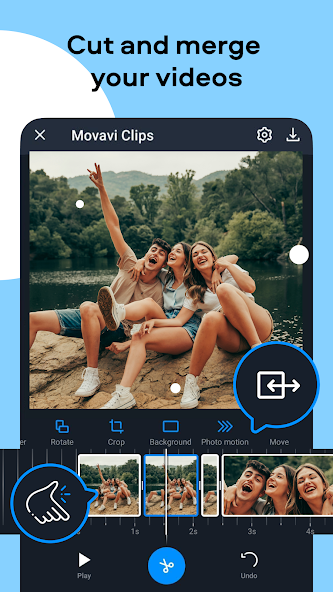


Video Editor Movavi Clips AI Editor's Review
Movavi Clips is a free, user-friendly video editor for Android. It offers a range of editing tools, including trimming, merging, adding music, filters, and transitions. Perfect for creating engaging videos on the go with its intuitive interface.
Comprehensive Analysis
Movavi Clips is a solid mobile video editor that excels in ease of use. The app provides a clean and straightforward interface, making it simple to trim videos, add music, apply filters, and insert transitions. While it lacks the advanced capabilities of professional desktop editors, it's perfect for quick edits and creating engaging content for social media. The absence of watermarks on free exports is a significant advantage. However, users seeking more sophisticated features might find it limiting.
Key Advantages
- Intuitive and easy-to-use interface suitable for beginners
- Offers a wide range of editing tools, including trimming, filters, and transitions
- Free to use with no watermarks on exported videos
Areas for Improvement
- Limited advanced editing features compared to desktop software
- Some features may require in-app purchases
The Description of Video Editor Movavi Clips
Site Editorial Commentary:Quick video editor: making good clips with music is easier than ever!
☆ Free movie maker with an intuitive interface☆ Quick and precise cutting capabilities
☆ All the essential video editing features included
Movavi Clips is an advanced video editor and slideshow maker for your mobile device! It provides everything necessary to create impressive videos or engaging social media Stories. Benefit from intuitive controls and a user-friendly interface, combined with powerful tools and HD-quality export.
You gain access to multiple editing tools, such as cropping and rotating, and you can enhance your movies with unique color filters, transitions, and themed stickers. Easily create fabulous slideshows with music tracks from the free built-in library and pictures from your albums. It’s so easy to use, you can become a real videostar with the power of video editing software right on your mobile device!
VIDEO EDITING FEATURES:
☆ Edit footage on the handy timeline of the video maker
☆ Split and combine video clips effortlessly
☆ Cut videos and remove unwanted sections with a simple swipe
☆ Merge videos in any order to create compelling stories
☆ Adjust brightness and saturation to optimize your images
☆ Insert smooth transitions between clips for a professional touch
☆ Add and edit pictures: apply automatic pan and zoom effects to create stylish slideshows
☆ Overlay cool and unique stickers to personalize your videos
☆ Add text to photos or clips, adjusting the position, font, size, and color
☆ Duplicate segments to insert comic moments in your video montage multiple times
☆ Rotate videos to correct footage that was accidentally shot in the wrong orientation
☆ Add fade-in and fade-out effects to enhance your movie's professionalism
☆ Speed up humorous videos to make them even funnier
☆ Slow down your clips and create stunning slow-motion video effects
☆ Add exquisite color filters to any picture and video to create a special atmosphere
☆ Crop videos and photos to emphasize important elements
☆ Add your own logo to make your videos truly exclusive
☆ Record voiceovers to add audio commentaries
AUDIO ADJUSTMENT OPTIONS:
☆ Overlay music from your device library or use the built-in collection
☆ Adjust music volume to your preference
☆ Mute original sound when needed
☆ Create a vivid slide show with background music
EXPORT AND SHARING:
☆ Preview the result in the built-in player of the video maker
☆ Save the movie directly to your device
☆ Share your creations with friends and family by uploading them to Instagram, Facebook, YouTube, and other social networks directly from the app
If you’re looking for the easiest way to edit videos and create your own movie or a slideshow, Movavi Clips is the perfect solution. With this video editor, you can add music to your video, split clips and splice videos together, adjust audio and video speed, and much more.
No prior editing experience? Don’t worry! With the Movavi video editing app, you don’t need any special knowledge or skills to create movies for your vlog or family archive. When you open the app, you will find valuable tips that will help you master our video clip maker in minutes.
Create memorable films about your family and friends or make videos for your daily vlog – Movavi Clips is a universal and user-friendly editing tool. Simply shoot some videos with your smartphone or tablet cam, download our movie editor for free, and edit videos like a pro!
What's New
Caught and killed some annoying bugs.


