
おサイフケータイ アプリ
Download Apkおサイフケータイ アプリ Application Screenshots




おサイフケータイ アプリ AI Editor's Review
"Osaifu-Keitai App" is essential for Japanese mobile payment users. It simplifies initial setup and manages various digital cards like e-money, transit passes, and membership cards, streamlining mobile transactions. A must-have for convenient cashless living in Japan.
Comprehensive Analysis
The "Osaifu-Keitai App" is a crucial tool for anyone using Osaifu-Keitai (mobile wallet) services in Japan. It streamlines the initial setup process, which can often be complex. The app allows users to manage their various digital cards, including electronic money (e.g., Suica, Pasmo, Edy, Nanaco), transit passes, and membership cards, all in one place. The user interface is relatively straightforward, though some Japanese language proficiency is helpful. Overall, it significantly enhances the convenience of mobile payments, making cashless transactions smoother for users in Japan.
Key Advantages
- Simplifies initial setup for Osaifu-Keitai functionality.
- Centralized management of various digital cards (e-money, transit, membership).
- Enhances convenience for cashless payments in Japan.
Areas for Improvement
- Primarily useful only within Japan due to Osaifu-Keitai's regional focus.
- May require understanding of Japanese to fully navigate the app.
The Description of おサイフケータイ アプリ
Site Editorial Commentary:The Osaifu-Keitai app is an app that displays and introduces a list of Osaifu-Keitai compatible services. You can use other functions required to use Osaifu-Keitai.
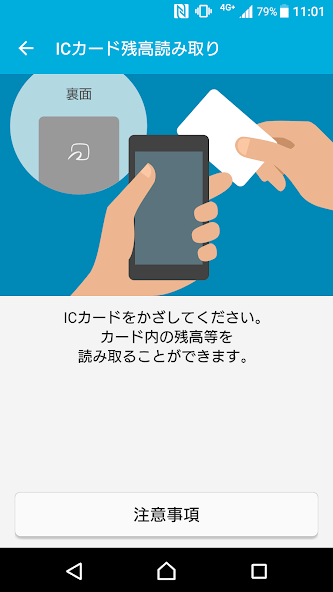
The "Osaifu-Keitai App" is essential for starting to use Osaifu-Keitai (mobile wallet) services in Japan. It allows users to perform the necessary initial setup and provides a comprehensive list of Osaifu-Keitai compatible services, including e-money, transit tickets, and membership cards. Stay informed with valuable notifications and easily check the balance of your physical IC cards. This application is a must-have for using iD and QUICPay (when configured through apps like Google Wallet), Mobile PASMO, Mobile Suica, and Mobile ICOCA. Key Features: * **My Services:** Displays a list of installed apps and configured services. Shows balances for your active e-money accounts. Customize the order of displayed services by long-pressing and rearranging them. * **Card Display:** Access card-related information for your services (links to service providers). Switch your main card (iD, Mobile Suica, Mobile PASMO, Mobile ICOCA). Deposit and retrieve service cards when changing devices (Mobile PASMO, Mobile Suica, Mobile ICOCA). * **Recommendations:** Discover available services, install required apps from Google Play, and view setup instructions. * **Notifications:** View a list of received notifications. * **IC Card Balance Reader:** Reads the balance of supported IC cards. * **FAQ:** Access frequently asked questions. * **Device Transfer Guide:** Guides you through the device transfer process. * **Lock Settings:** Access your smartphone's settings for Osaifu-Keitai function lock. * **Service Introduction Site:** Links to various service websites. * **Campaign Site:** Links to promotional campaign websites. * **Hold Over Notification (※1):** Notifies balance changes on your phone when you hold your phone over an e-money reader. Other Functions: * Initial Setup * Service Information Updates * Support/Terms of Service * Memory Usage * About Osaifu-Keitai * Terms of Use * Version Information * Settings * Notification Settings * Hold over Notification Settings * Google Account Switching Notification Settings * IC Card reading Target Screen Restriction Settings * Login with Google, display logged-in Google account, display account switching history, etc. Important notes: * This app is compatible with Osaifu-Keitai enabled smartphones (check the compatible models). * The app requires an internet connection. * It's recommended to keep the app updated to the latest version for optimal performance and access to all features. Please update to the latest app version before contacting support. * Osaifu-Keitai services like e-money are provided by individual service providers. Refer to their instructions for settings and usage. * Compatibility varies between this app and each Osaifu-Keitai service. Check the information provided by each service provider. * Supported IC cards for balance reading: Rakuten Edy, nanaco, WAON, and transit IC cards. Some cards may not be supported. If reading fails, try repositioning the card. Note that some devices may have difficulty reading IC cards. * "Login with Google" is required for using iD, QUICPay, Mobile PASMO, and Mobile Suica. * When transferring Mobile PASMO, Mobile Suica, or Mobile ICOCA to a new device, you must use the same Google account that was used during the initial registration. * To check your Google login status or perform Google login operations within the app, please refer to: [https://ap.pitsquare.jp/osaifu/sp/help/faqlist.html#googledelogin_or_not](https://ap.pitsquare.jp/osaifu/sp/help/faqlist.html#googledelogin_or_not) * For assistance with Google account recovery, password resets, or two-factor authentication, please visit Google's help site: [https://support.google.com/accounts/troubleshooter/2402620?hl=ja&ref_topic=3382255](https://support.google.com/accounts/troubleshooter/2402620?hl=ja&ref_topic=3382255). Note that Osaifu-Keitai support ([email protected]) cannot assist with Google account issues. * On some devices, the app may not launch if the system font size is modified. Please update to the latest version. * NFC must be enabled to use Osaifu-Keitai. This is different from "Reader/Writer, P2P" settings. ※1 "Hold Over Notification" is a function that notifies fluctuations such as balances on the notification display part of the mobile phone when the mobile phone is held over an electronic money reader (※2). The presence or absence of notification and the content of notification differ depending on the type of electronic money used, transaction details, how to hold the phone, and the status of the mobile phone, and accuracy is not guaranteed, so please use it as reference information. ※2 If you want to stop the "Hold Over Notification", turn OFF "Hold Over Notification Setting" from the settings of this application. Also, if you want to receive notifications again after stopping the notification, change it to ON. On some models, when changing the "Hold Over Notification Setting" to ON, it is necessary to exclude this application from battery optimization. To exclude it, select "All apps" from the pull-down menu in Mobile phone settings → Apps and notifications → Advanced settings → Special app access → Battery optimization, and set Osaifu-Keitai App to "Do not optimize". FAQ: * Tap the three lines in the upper left corner of the app → FAQ * Troubleshooting | Osaifu-Keitai Guide: [https://ap.pitsquare.jp/osaifu/sp/help/index.html](https://ap.pitsquare.jp/osaifu/sp/help/index.html) * Transit IC Card Questions | Osaifu-Keitai Guide: [https://ap.pitsquare.jp/osaifu/sp/help/tr-faq.html](https://ap.pitsquare.jp/osaifu/sp/help/tr-faq.html) Compatible Devices (Latest App Version): * Osaifu-Keitai enabled smartphones with Android OS version 5.0.0 or higher. * However, some models are not compatible with this app (e.g., "Garaho" devices, devices that do not support Google Play Developer Services). *"Osaifu-Keitai" is a registered trademark of NTT DoCoMo, Inc. *"Garaho" is a registered trademark of KDDI Corporation. *Service names and app names mentioned above are trademarks or registered trademarks of their respective companies. *Part of the content on this page is a reproduction of content created and provided by Google and is used in accordance with the terms described in the Creative Commons Attribution 3.0 License.What's New
■最新バージョンは「36.26.20」です。Ver. 36.26.20・軽微な修正を行いました。●おサイフケータイでお困りの方はこちら●https://ap.pitsquare.jp/osaifu/


