
Video Cutter
Download ApkVideo Cutter Application Screenshots




Video Cutter AI Editor's Review
Video Cutter is a simple app for trimming and cutting video clips. It offers basic functionality for quick edits, making it suitable for users who need fast and straightforward video processing on their Android devices. Easy to use, but lacks advanced features.
Comprehensive Analysis
Video Cutter is designed for users seeking a quick and easy way to trim videos. The application allows users to select a start and end point to cut videos. While the app provides basic functionality for trimming, it lacks advanced features such as video merging, filters, or transitions. The user interface is straightforward, making it accessible to beginners. However, the limited format support and absence of advanced features might be a drawback for more demanding users.
Key Advantages
- Simple and intuitive interface
- Fast video processing
- Easy to trim video clips
Areas for Improvement
- Lacks advanced editing features
- Limited format support
The Description of Video Cutter
Site Editorial Commentary:Video Cutter app trims a video clip fastest and easiest for Android
This Video Cutter application offers powerful video editing capabilities directly on your Android device. It allows you to precisely cut & trim videos by selecting specific start and end times, enabling you to efficiently remove unnecessary sections from your video clips. Functioning as a combination of video splitter and joiner, this app supports a wide range of video formats.A standout feature is its ability to trim videos of virtually unlimited length. You can easily reduce a 2-3 hour video down to 15-20 minutes in just a couple of minutes. This application is engineered for speed, offering one of the fastest video processing Experiences available on the Google Play Store. Once you've finished editing, you can conveniently share your creations with friends directly through the app.
**Key Features:**
* **Video Cutter:** Quickly trim video clips on your Android device with precision.
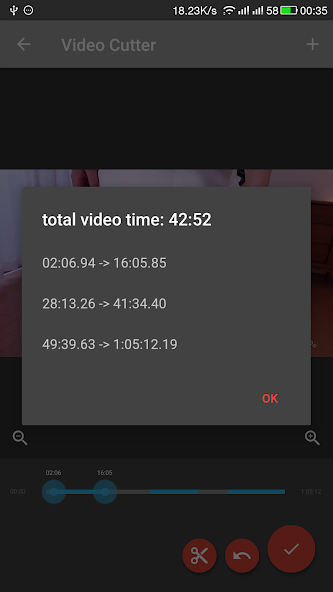
* **Multiple Video Cuts:** Split a single video into several shorter clips, and then seamlessly join them back together into a final video.
* **SD card Saving:** Save your edited videos directly to your phone's SD card.
* **Video Sharing:** Share your video clips via email or directly upload them to platforms like YouTube, Facebook, Twitter, and Instagram.
* **Video Playback:** Easily play your video clips within the app.
* **CPU Support:** Compatible with both ARM and x86 CPUs in a single package.
**How to Use:**
* Step 1: Select the video file you want to edit.
* Step 2: Cut the video clip and remove any unwanted parts.
* Step 3: Save your edited video.
Unlike many other video editing apps on the Play Store, this free version comes without any watermarks, providing a clean and professional finish to your videos.
What's New
Best video cutter on Google Play
v 1.1
* optimize material UI
* support Android M
v 1.2 - 1.2.6.1
* Bugs fixed
* Optimizing Apps for Speed and Usability
* upgrade video cutter lib
* support Android N and Oreo


