
Car Computer - Olivia Drive | ELM327 OBD2
Download ApkCar Computer - Olivia Drive | ELM327 OBD2 Application Screenshots
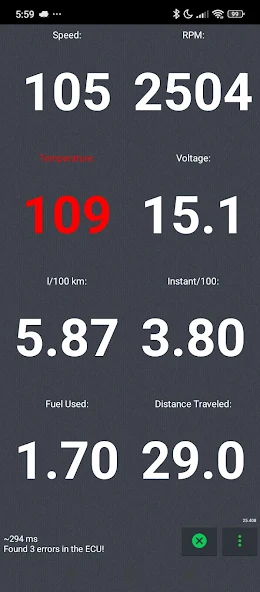


Car Computer - Olivia Drive | ELM327 OBD2 AI Editor's Review
Car Computer - Olivia Drive transforms your smartphone into a powerful in-car computer using an ELM327 OBD2 adapter. Monitor vehicle performance, diagnose issues, and track driving data in real-time. A valuable tool for car enthusiasts and everyday drivers alike.
Comprehensive Analysis
Car Computer - Olivia Drive leverages an ELM327 OBD2 adapter to provide users with a comprehensive in-car computer experience. It displays real-time data such as speed, RPM, fuel consumption, and engine temperature. The app also offers diagnostic capabilities, allowing users to read and clear trouble codes. The interface is customizable, allowing users to create personalized dashboards. While requiring a separate OBD2 adapter is a drawback, the app provides valuable insights into vehicle performance and health.
Key Advantages
- Real-time vehicle performance monitoring
- Comprehensive diagnostics using OBD2 adapter
- Customizable dashboard for personalized data display
Areas for Improvement
- Requires an ELM327 OBD2 adapter
- App functionality relies on adapter compatibility
The Description of Car Computer - Olivia Drive | ELM327 OBD2
Site Editorial Commentary:Car computer Olivia Drive - OBD2 for cars working with the adapter ELM327.
car Computer - Olivia Drive is a comprehensive on-board computer application designed for Vehicles equipped with an OBDII interface and utilizing the SAE J1979 standard. This app transforms your Android device into a powerful diagnostic and monitoring tool, providing real-time data and insights into your vehicle's performance.Key Features:
* **Real-time Data Display:** Monitor a wide range of parameters, including instantaneous fuel flow (per hour, per 100 km), fuel consumption (per 100 km), fuel spent per trip, trip distance, engine speed, vehicle speed, engine temperature, onboard network voltage, average speed, and many more.
* **Detailed Trip Logging:** Keep track of your journeys with a comprehensive trip log, including export options. Visualize dynamic parameters with interactive graphs, supporting approximately 100 standard OBDII sensors.
* **Diagnostic Capabilities:** Read and clear diagnostic trouble codes (DTCs) with decoding for over 5000 error codes. Identify and resolve potential issues with ease.
* **Performance Testing:** Utilize the acceleration test feature to measure your vehicle's performance.
* **Heads-Up Display (HUD) & Floating Widget:** Benefit from a convenient HUD mode for displaying data on your windshield and a floating widget that overlays data on top of any other application.
* **Background Operation:** The app can run as a background service, allowing you to answer calls or use other apps without interrupting data collection.
* **Advanced Fuel Consumption Analysis:** Includes fuel flow correction using long-term and short-term corrections from the vehicle's ECU (MAF only). The app also supports methods for determining engine braking (fuel supply off).
* **High-Speed Data Acquisition:** Benefit from a group request mode for rapid data updates, up to 8 times per second. Experience fast communication with the vehicle's ECU, with readings up to 20 times per second for single parameters.
* **Additional Features:** Includes charge calculation based on car load, customizable notifications for out-of-range parameters, and error decoding in English.
Getting Started:
1. Pair your ELM327 adapter (Bluetooth or Wi-Fi) with your Android device.
2. Select your adapter within the Olivia Drive app settings.
3. Enter your car's engine volume (default is 1598 cm3).
4. Choose your vehicle's fuel type (petrol, Diesel, or Gas).
5. Ensure proper setup of "DEFINITION OF THE ENGINE BRAKE" if using that feature to ensure accurate fuel consumption data.
Available languages: English, Russian, Spanish, German, French, Ukrainian, Belarusian, Polish, Portuguese, Czech, Italian, Greek, Kazakh, Korean, Arabic, Georgian, Turkish, Japanese, Finnish
What's New
* Android 11 support


