
aodNotify
Download ApkaodNotify Application Screenshots


aodNotify AI Editor's Review
aodNotify brings missing notification LEDs to Samsung Galaxy devices by utilizing Always On Display. Customize colors and styles for various apps. Stay informed at a glance!
Comprehensive Analysis
aodNotify effectively addresses the absence of notification LEDs on Samsung Galaxy devices. It cleverly uses the Always On Display to simulate notification lights, allowing users to customize colors and styles for individual apps. The setup is relatively straightforward, and the app provides a clear visual indication of pending notifications. While battery consumption might increase slightly, the convenience of having a visible notification system is a definite advantage. The app's performance is generally reliable, though accuracy can be affected by aggressive battery optimization settings.
Key Advantages
- Provides customizable notification light functionality
- Offers app-specific color and style settings
- Utilizes Always On Display effectively to show notifications
Areas for Improvement
- May consume slightly more battery due to Always On Display usage
- Notification accuracy depends on system settings and app permissions
The Description of aodNotify
Site Editorial Commentary:aodNotify - Notification light / LED for Samsung Galaxy S23, S22, A52, Note20...
Need a notification light or LED indicator for your Samsung Galaxy S23, S22, note 20, S21, S10, Note 10, or A52 device? aodNotify is the perfect solution!With aodNotify, you can effortlessly add a customizable notification light or LED directly to Samsung's Always On Display, ensuring you never miss important alerts again! This innovative app enhances your device's functionality by providing visual cues for notifications, even when your screen is off.
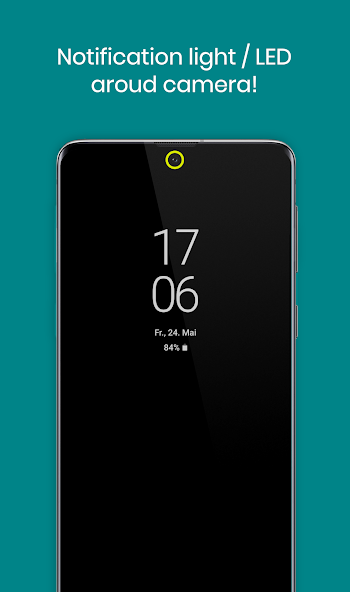
Choose from a variety of notification light styles! Display the light around the camera cutout, along the screen edges, or simulate a classic LED notification dot in the status bar of your Galaxy S23, S22, Note 20, S21, S10, Note 10, or A52 series device.
Personalize your notification experience with dozens of smooth, animated light effects! Select from options like LED blink, neon glow, echo pulses, and many more to create a unique visual style.
Because the notification light is seamlessly integrated into Samsung's Always On Display, aodNotify boasts minimal battery consumption. Unlike other apps that keep your phone awake, aodNotify is designed to be energy-efficient and won't drain your battery.
If you prefer not to use the Always On Display continuously, aodNotify can activate the AOD only when notifications arrive. It can even display the notification light or LED without the Always On Display being active, providing flexibility to suit your preferences.
The notification preview feature allows you to quickly see the notification sender without fully waking your Galaxy phone, saving you time and battery life.
MAIN FEATURES:
• Provides a notification light/LED for Samsung Galaxy S23, S22, Note 20, S21, S10, Note 20, A52, and more!
• Offers low-energy notification previews
• Activates the Always On Display (AOD) only when notifications are received
• Includes charging and low battery light/LED indicators
MORE FEATURES:
• Offers various light effects, such as LED blink and echo!
• Keeps you notified without sound!
• Provides multiple notification light styles (around camera, screen edges, LED dot)
• Allows custom app and contact colors
• Includes ECO animations for battery saving
• Offers interval mode (on/off) to further conserve battery
• Features night times to reduce battery usage during sleep
• Designed for minimal battery consumption
BATTERY USAGE PER HOUR (APPROXIMATE):
• NOTIFICATION LIGHT: 3.0%
• NOTIFICATION LIGHT in INTERVAL MODE: 1.5%
• NOTIFICATION LIGHT in ECO ANIMATION: 1.5%
• NOTIFICATION LIGHT in ECO ANIMATION & INTERVAL MODE: 1.0%
• NOTIFICATION PREVIEW: 0.5%
• ALWAYS ON DISPLAY: 0.5%
When the notification light or LED is disabled, the app consumes nearly 0% battery!
SUPPORTED SAMSUNG DEVICES:
• Galaxy S23 / S22 / S21+ / S21 Ultra
• S21 / S20+ / S20 Ultra
• Galaxy S8 / S9 / S10 / S10+
• Note 8 / Note 9 / Note 10 / Note 20
• A52 / A72 / A51 / A71
• A6 / A7 / A8 / A9
• A30 / A50 / A70 / A80
• C5 / C7 / C8 / C9
• M30
IMPORTANT NOTES:
• This app is currently not compatible with Samsung's new Android 14 update. The developer is actively working on a solution.
• This app utilizes accessibility services to provide visual notification feedback for users in loud environments, as well as those who are hard of hearing or deaf.
• Samsung may potentially block this app with future updates!
• Please ensure the app is compatible before updating your phone's software or Always On Display!
• Although no screen burn-in issues have been observed during testing, it is recommended to avoid keeping the notification light or LED active for extended periods. Use at your own discretion.
"Samsung Galaxy" is a registered trademark of "SAMSUNG ELECTRONICS".
Disclosure:
This app uses the AccessibilityService API to display a floating popup, enabling multitasking.
No data is collected or shared through the AccessibilityService API!


