
Holy Quran (16 Lines per page)
Download ApkHoly Quran (16 Lines per page) Application Screenshots



Holy Quran (16 Lines per page) AI Editor's Review
Holy Quran (16 Lines per page) offers a clear and concise reading experience with its standardized format. Ideal for daily recitation and memorization, it provides easy navigation and a familiar layout for users accustomed to this specific style of Quran reading.
Comprehensive Analysis
The Holy Quran (16 Lines per page) app presents the Quran in a standardized 16-line format, which is familiar to many users. This fixed layout aids in consistent reading and memorization. Navigation is straightforward, allowing users to quickly jump to specific Surahs and Ayahs. While the app excels in providing a clear and focused reading experience, it lacks advanced customization features such as font adjustments or themes. Overall, it's a reliable and user-friendly application for those who prefer the traditional 16-line page format.
Key Advantages
- Clear and consistent 16-line page format for easy reading.
- Optimized for memorization and daily recitation.
- Simple and intuitive navigation.
Areas for Improvement
- Limited customization options for font and theme.
- May not appeal to users preferring different page layouts.
The Description of Holy Quran (16 Lines per page)
Site Editorial Commentary:Special 16 line Holy Quran with feeling of real Quran in your hand.
This special edition of the Holy Quran follows a specific, standardized format of sixteen lines per page, meticulously designed for Hafiz-e-Quran – Muslims dedicated to complete Quran memorization in madrasas, Schools, or other religious institutions.Enhance your Quran recitation and deepen your spiritual connection with an authentic feel that mirrors the experience of reading a printed Quran, accessible anytime, anywhere. This Holy Quran app features a Realistic page-turning effect, an elegant style, a smooth nastaliq font, and customizable modes to optimize readability.
Now equipped with a range of new customization options, this app prioritizes your visual comfort during reading sessions.
Easy navigation:
Navigate effortlessly through the Quran. Open any Juz or Surah directly from the index, which includes all 30 chapters (Juz) and 114 Surahs. Long-press to view detailed information. The resume option seamlessly takes you back to your last read page. The go-to page number function allows instant page access.
Quick Toolbar:
A newly integrated toolbar on the Holy Quran pages provides quick access to essential functions such as saving bookmarks, night mode, page sound, page overlay, and settings.
Bookmarks:
Save unlimited bookmarks for your favorite Surahs or pages. Simply tap the bookmark icon in the quick toolbar while reading to save the current page. If the quick toolbar is disabled, use the volume-up button. Add new bookmarks via the bookmarks menu by pressing the Plus button.
Brightness ConTroller:
Customize and adjust the page brightness within the app settings. These settings will not affect your phone's system-wide brightness.
Font Colors:
Personalize your reading experience by changing the font color of the pages. Choose from five available font colors, a feature particularly beneficial for individuals with color-blindness.
Page Presets:
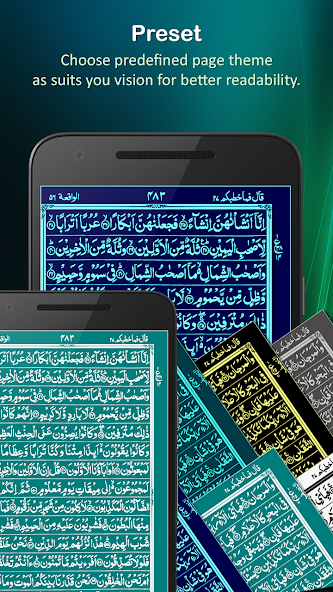
Transform the appearance of the Quran pages with page presets, offering beautiful combinations of colored backgrounds and text. Select from five presets in the settings menu.
Night Mode:
Activate night mode to invert the color scheme, displaying white text on a black background for comfortable reading at night or in low-light environments.
Overlay Mode:
If you find the default colors or brightness levels straining on your eyes, use the page overlay feature. This creates a colored overlay as a protective shield, mitigating harsh colors and brightness. Adjust the color shade and intensity in the settings.
Highlighted Verses:
Sajdah ayaat (verses requiring prostration) are highlighted in green. The beginning of each Juz is clearly marked by the first line with a black background.
Other Features:
- The screen remains active while you are reading.
- On-screen notifications appear when settings are changed.
- Double-tap the back button to exit the application.
- Page reflection simulates a mirror image of the page being turned, which can be toggled on or off in the settings.
- Explore additional options in the side menu.
Compact Size:
Enjoy a single, lightweight download. Unlike many Quran applications that require 100MB to 500MB of external data after installation, this app requires no additional downloads.
Easy Sharing:
Participate in spreading the teachings of the Holy Quran and help others benefit from its blessings. Share the app with friends and family via SMS, email, Bluetooth, Facebook, WhatsApp, and other sharing platforms.
Feedback:
Your suggestions, recommendations, and improvement ideas are highly valued. Please send your feedback to [email protected].
Remember us in your prayers.
What's New
✅ Performance improvements for faster and smoother experience📱 Improved overall compatibility and stability


