
CPU-Z
Download ApkCPU-Z Application Screenshots


CPU-Z AI Editor's Review
CPU-Z for Android provides detailed hardware information about your device, including CPU, RAM, sensors, and more. It's a must-have tool for tech enthusiasts and anyone curious about their phone's specifications.
Comprehensive Analysis
CPU-Z is the Android adaptation of the well-known PC utility, offering extensive details about your device's hardware. It accurately identifies the CPU model, RAM capacity, storage details, and various sensors. The app provides real-time monitoring of CPU frequency, temperature, and battery level. While the interface is straightforward, the sheer amount of information might be daunting for some users. Overall, CPU-Z is a valuable tool for understanding your Android device's inner workings, although sensor readings may sometimes be inaccurate.
Key Advantages
- Comprehensive hardware information
- Real-time monitoring of CPU and system stats
- User-friendly interface
Areas for Improvement
- Can be overwhelming for non-technical users
- Occasional inaccuracies in sensor readings
The Description of CPU-Z
Site Editorial Commentary:CPU-Z is an application that reports information about your Android device.
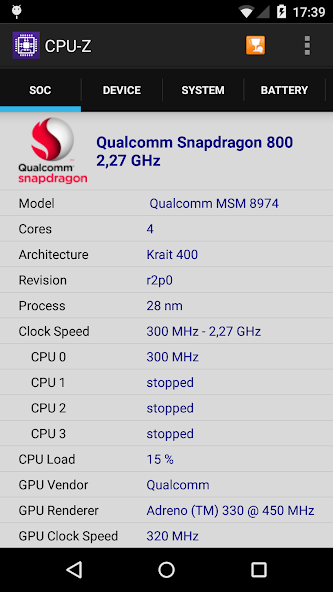
CPU-Z is the Android adaptation of the well-regarded CPU identification utility for PCs, providing comprehensive details about your device's hardware. This free application delivers key insights into your Android device's system-on-chip (SoC), system information, battery, and sensors. Key Features: - **SoC Details:** Identifies the System on Chip (SoC) name, architecture, and clock speed for each core, offering a deep dive into your device's processing capabilities. - **System Overview:** Presents essential system information, including device brand and model, screen resolution, RAM capaCity, and storage details. - **Battery Insights:** Monitors battery level, status (charging/discharging), temperature, and capacity, helping you understand your device's power performance. - **Sensor Array:** Lists the various sensors available on your device, providing a comprehensive hardware overview. Requirements: - Compatible with Android 2.2 (Froyo) and later versions (from version 1.03 onwards). Permissions: - **Internet:** Required for online validation of your device's hardware specifications. - **Access Network State:** Used for collecting anonymous usage statistics to improve the app. Online Validation: - Starting with version 1.04, CPU-Z allows you to validate and store your Android device's hardware specifications in an online database. Upon validation, a unique URL is generated, which can be optionally sent to your email address for future reference. Troubleshooting: - In the event of abnormal application closure due to bugs, a settings screen will appear upon the next launch. This screen enables you to disable specific detection features to ensure the application runs smoothly. Bug Reporting: - To report any bugs or issues, use the "Send Debug Infos" option in the application menu to send a detailed report via email. This helps the developers improve the app's stability and performance. For frequently asked questions and further troubleshooting, please visit the official CPU-Z Android FAQ: http://www.cpuid.com/softwares/cpu-z-android.html#faq


