
Total Connect Comfort
Download ApkTotal Connect Comfort Application Screenshots


Total Connect Comfort AI Editor's Review
Honeywell's Total Connect Comfort app offers remote control of your home's heating and cooling systems. Manage thermostats, schedules, and energy usage from anywhere, ensuring comfort and efficiency. Stay connected and in control of your home environment with this user-friendly app.
Comprehensive Analysis
The Total Connect Comfort app by Honeywell provides a convenient way to manage your home's heating and cooling system remotely. Users can adjust thermostat settings, create custom schedules, and monitor energy consumption. The app's interface is generally intuitive, allowing for easy navigation and control. While the app offers significant convenience, some users have reported occasional connectivity problems. Ensure compatibility with your Honeywell devices before relying heavily on this app for critical climate control.
Key Advantages
- Remote thermostat control from anywhere
- Customizable scheduling for energy savings
- User-friendly interface for easy navigation
Areas for Improvement
- Occasional connectivity issues reported by users
- Limited compatibility with older Honeywell devices
The Description of Total Connect Comfort
Site Editorial Commentary:Remotely monitor and manage your heating and cooling system.
The Honeywell Total Connect Comfort app provides seamless remote access to monitor and manage your home's heating and cooling system from virtually anywhere, at any time. This app is designed to work with Honeywell Wi-Fi Thermostats, as well as Prestige®, Prestige® IAQ, Wireless FocusPRO®, and EConnect™ Comfort Systems when paired with Honeywell’s Internet Gateway.Key features of the Honeywell Total Connect Comfort app include:
* **Scheduling:** View and modify the temperature schedule of your compatible thermostats.
* **Demo Mode:** Explore the app's functionality and user interface before committing to a thermostat purchase.
* **System Settings:** Adjust heating and cooling system parameters to optimize your comfort and energy efficiency.
* **Temperature Monitoring:** View and set the desired indoor temperature directly from your mobile device.
* **Fan Control:** Manage your system's fan settings (available on supported thermostats).
* **Humidity Control:** Adjust humidifier and dehumidifier settings for optimal indoor air quality (on compatible thermostats).
* **weather Forecast:** Stay informed with a 5-day weather forecast for your location.
* **Outdoor Conditions:** Monitor outdoor temperature and humidity levels (when connected to an outdoor sensor).
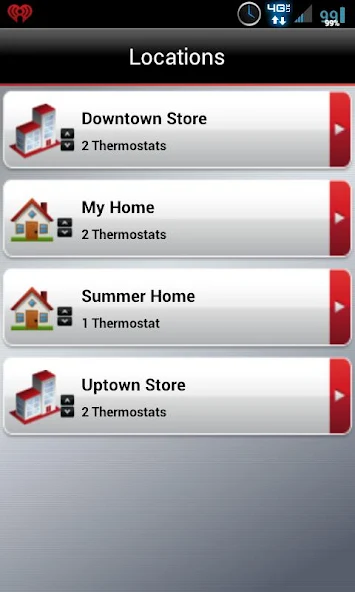
* **Multi-Thermostat Support:** Manage multiple smart thermostats within a single app.
* **Multi-Location Access:** Control systems across multiple properties from one centralized account.
* **Alerts and Notifications:** Receive thermostat alerts, such as notifications for high or low temperature conditions.
* **Automatic Updates:** Enjoy the latest features and enhancements with automatic software updates.
Whether you're a homeowner or a business owner, the Total Connect Comfort app offers a convenient and reliable solution for managing your indoor climate and optimizing energy consumption.


