
iVCam
Download ApkiVCam Application Screenshots




iVCam AI Editor's Review
iVCam turns your smartphone into a high-definition webcam for your PC. Easy to set up and use, it offers better video quality than most built-in webcams. Perfect for video conferencing, streaming, and online classes. Save money and repurpose your existing device!
Comprehensive Analysis
iVCam cleverly transforms your smartphone or tablet into a versatile webcam for your computer. It supports various resolutions and frame rates, offering superior image quality compared to many integrated webcams. The setup process is straightforward, involving installing software on both your phone and PC. Once connected via Wi-Fi or USB, iVCam seamlessly transmits video. While convenient, prolonged usage can impact your phone's battery life, and a stable connection is crucial for optimal performance. Overall, it's a cost-effective and practical solution.
Key Advantages
- Excellent video quality compared to standard webcams
- Easy to set up and use with a simple interface
- Saves money by utilizing existing smartphone hardware
Areas for Improvement
- Relies on a stable Wi-Fi or USB connection
- May drain smartphone battery during prolonged use
The Description of iVCam
Site Editorial Commentary:iVCam turns your smartphone / tablet into an HD webcam for Windows PC.
Why invest in a separate webcam when you already possess a powerful smartphone or tablet?iVCam cleverly transforms your smartphone or tablet into a high-definition webcam for your Windows PC, offering a superior alternative to traditional USB webcams or integrated cameras. Experience enhanced video quality without the added expense.
running out of storage space? iVCam offers a unique solution by recording videos directly to your PC, functioning seamlessly as a remote video recorder. Free up valuable space on your mobile device while capturing high-quality footage.
Setting up iVCam is incredibly straightforward. Simply download and install our client software on your PC, and you're instantly ready to go! The connection process is fully automated, eliminating the need for complex manual configurations.
Key Features:
- Delivers high-quality, real-time video with minimal latency and exceptional speed.
- Establishes automatic connections via Wi-Fi or USB for effortless usability.
- Operates discreetly in the background, ensuring uninterrupted use of other applications.
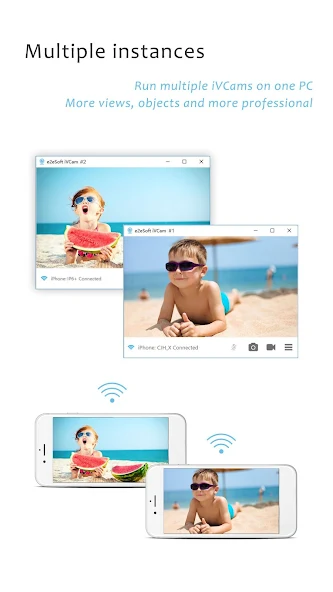
- Enables simultaneous connection of multiple devices to a single PC.
- Supports a wide range of video resolutions, including 4K, 2K, 1080p, 720p, 480p, and 360p.
- Provides advanced camera settings such as AE/AF, ISO, EC, WB, and Zooming for precise control.
- Allows configuration of video frame rate, quality, and encoder to suit your specific needs.
- Supports both Landscape and Portrait modes for versatile usage.
- Compatible with front/rear, wide-angle/telephoto cameras, with real-time switching capabilities.
- Includes features like face beautification, flash control, manual/auto focus, and video flip/mirror.
- Offers background replacement options, including Blur, Bokeh, Mosaic, Green Screen, and more, to enhance your video aesthetics.
- Supports audio input, allowing you to use your smartphone as a wireless microphone for your PC.
- Serves as a complete replacement for USB webcams or integrated cameras, ensuring compatibility with most webcam-enabled applications.
- Allows you to preview video, capture photos, and record video files using our dedicated Windows client software.
Download the required Windows client software from http://www.e2esoft.com/ivcam.
Terms of Use:
https://www.e2esoft.com/ivcam/terms-of-use.
Foreground Service Activation Notice:
To maintain uninterrupted video and audio capture, even when your device is locked, we employ a foreground service to optimize power efficiency and ensure stable operation. A persistent notification is displayed in the notification bar to inform you that the service is active, with an option to stop the foreground service directly from the notification.
What's New
Fixed crash issues and improved stability.


