
Plastic Surgery Simulator
Download ApkPlastic Surgery Simulator Application Screenshots
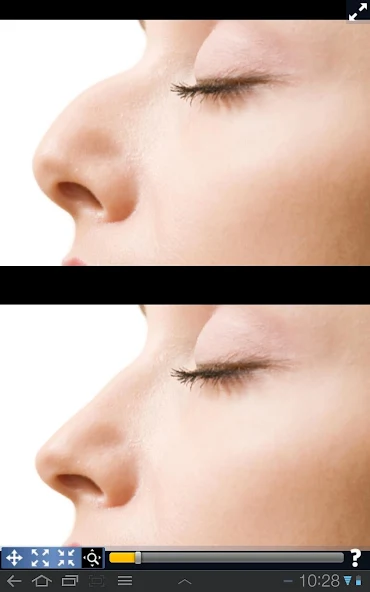


Plastic Surgery Simulator AI Editor's Review
Plastic Surgery Simulator is a photo distortion app for fun face transformations. Easily reshape facial features, slim down, or enhance areas. Simple to use, but results may vary. A lighthearted way to experiment with virtual cosmetic adjustments on photos.
Comprehensive Analysis
Plastic Surgery Simulator is a straightforward photo distortion app that lets you playfully alter facial features in your photos. The app provides tools to reshape noses, enlarge eyes, slim faces, and more. While easy to use, the results often appear artificial and lack subtlety. The app's simplicity is both a strength and a weakness; it's accessible to everyone but lacks the precision needed for realistic transformations. It's best suited for lighthearted entertainment rather than serious cosmetic planning.
Key Advantages
- Easy to use interface
- Offers a variety of distortion tools
- Fun and entertaining for lighthearted photo manipulation
Areas for Improvement
- Results can appear unrealistic
- Limited fine-tuning options
The Description of Plastic Surgery Simulator
Site Editorial Commentary:How would you look like with a differently shaped nose, chin or lips?
This is a simple yet powerful photo distortion app designed to simulate body transformations and enhance your appearance. Use it to playfully warp people or to explore potential cosmetic changes, all within a user-friendly interface. Simply drag, grow, or shrink the body parts you want to modify.Discover how you might look with a different nose, chin, lips, or with added muscle definition. Reshape and resize any feature to visualize your desired look!
Our app distinguishes itself through two key features:
Firstly, a robust photo distortion algorithm ensures smooth and Realistic transformations.
Secondly, a unique dual display mode clones your image onto the other half of the screen when you rotate your device. This innovative design allows you to modify your image without your finger obstructing the area you're editing, making it perfect for precise adjustments on smaller touch screen devices like your phone.
What's New
Support for newest android releases and devices


